Decoding Meshtastic with GNURadio on a Raspberry Pi
I've been playing with Meshtastic a lot, since learning about it at Open Sauce last year. I'm up to 5 little LoRa radios now, and I'm working on a couple nicer antenna placements, so I can hopefully help shore up some of the north-south connections on the MeshSTL map.
To better understand the protocol, I wanted to visualize Meshtastic communications using SDR (Software Defined Radio). I can do it on a Mac or PC, just setting GQRX, SDR++, or SDR#, and watching the LongFast frequency centered on 902.125 MHz:

Every so often, if you have any Meshtastic nodes in your area, you'll see some digital data being received.
But I wanted to build a nicer portable display using a Raspberry Pi 5 and the DeskPi 7.84" rackmount touchscreen. This would allow me to rackmount the Pi, an SDR, and the touchscreen in a diminutive Rackmate TT and bring it with me to events—like Open Sauce—to help educate others on what you can see and do with SDR.
Video
I published a video today going over this whole setup—along with some experiments with ADS-B traffic and Meshtastic from inside an airplane—on my YouTube channel:
Setting up the Pi with GNURadio
GNU Radio, while not perfect, is like a swiss army knife for SDR. It works on nearly everything, and you can custom program almost any kind of transciever, encoder, or decoder, where simpler SDR software falls short. If you want to dive right into a great, comprehensive overview, read Murat Sever's Intro to GNU Radio. (It is daunting at first.)
Installation on the Pi is easy, since it's in the official Apt repositories. Open Terminal, and enter the command:
sudo apt install -y gnuradio cmake
(cmake will be used to compile a LoRa library later.)
If you're using a HackRF One, install the system drivers:
sudo apt install -y hackrf libhackrf-dev soapysdr-module-hackrf
Note: Most of the SDR projects I work on can also run on an RTL-SDR v4 or a Nooelec RTL-SDR v5. Also, on my Mac, I followed this guide to get the HackRF running with GNU Radio on macOS. Things are a little harder on Mac vs Linux...
After everything's installed, you can launch GNU Radio's GUI under Pi menu > Programming > GNU Radio Companion.

If you're having trouble launching it, and you get an error window:
ModuleNotFoundError

Cannot import gnuradio.

Is the python path environment variable set correctly?
    All OS: PYTHONPATH

Is the library path environment variable set correctly?
    Linux: LD_LIBRARY_PATH
    Windows: PATH
    MacOSX: DYLD_LIBRARY_PATH
...then you may need to force-install an older version of numpy (see this issue). Run pip install numpy==1.26.4. If you have trouble launching GNU Radio Companion, and the error message is a little cryptic, try launching it from the command line, with gnuradio-companion.
Building Meshtastic into GNU Radio
For Meshtastic decoding, instead of writing things from scratch, I'm relying on the excellent Meshtastic_SDR project by Josh Conway.
First, clone the project to your Pi by running the following Terminal commands:
cd Downloads
git clone https://gitlab.com/crankylinuxuser/meshtastic_sdr.git
Then, install some other dependencies:
# Install the official Meshtastic Python library
pip3 install meshtastic --break-system-packages

# Install the LoRa SDR transceiver plugin for GNU Radio.
sudo apt install -y cmake
git clone https://github.com/tapparelj/gr-lora_sdr
cd gr-lora_sdr
mkdir build && cd build
cmake .. -DCMAKE_INSTALL_PREFIX=/usr/local
sudo make install -j$(nproc)
sudo ldconfig
At this point, the LoRa integration should be installed.
Visualizing Meshtastic on preset channels
If you had GNU Radio Companion open, re-launch it. Otherwise, open it up, then under File > Open, open the file inside ~/Downloads/meshtastic_sdr/gnuradio scripts/RX/Meshtastic_US_allPresets.grc (assuming you're in the US, and using an SDR with enough bandwidth to monitor all channels, like the HackRF One.
If you have a less expensive/fancy SDR, you can open one of the other RX files that targets a narrower range of frequencies, for example Meshtastic_US_62KHz_RTLSDR.grc for the RTL-SDR v4.

Run the flow by clicking the 'Play' icon.
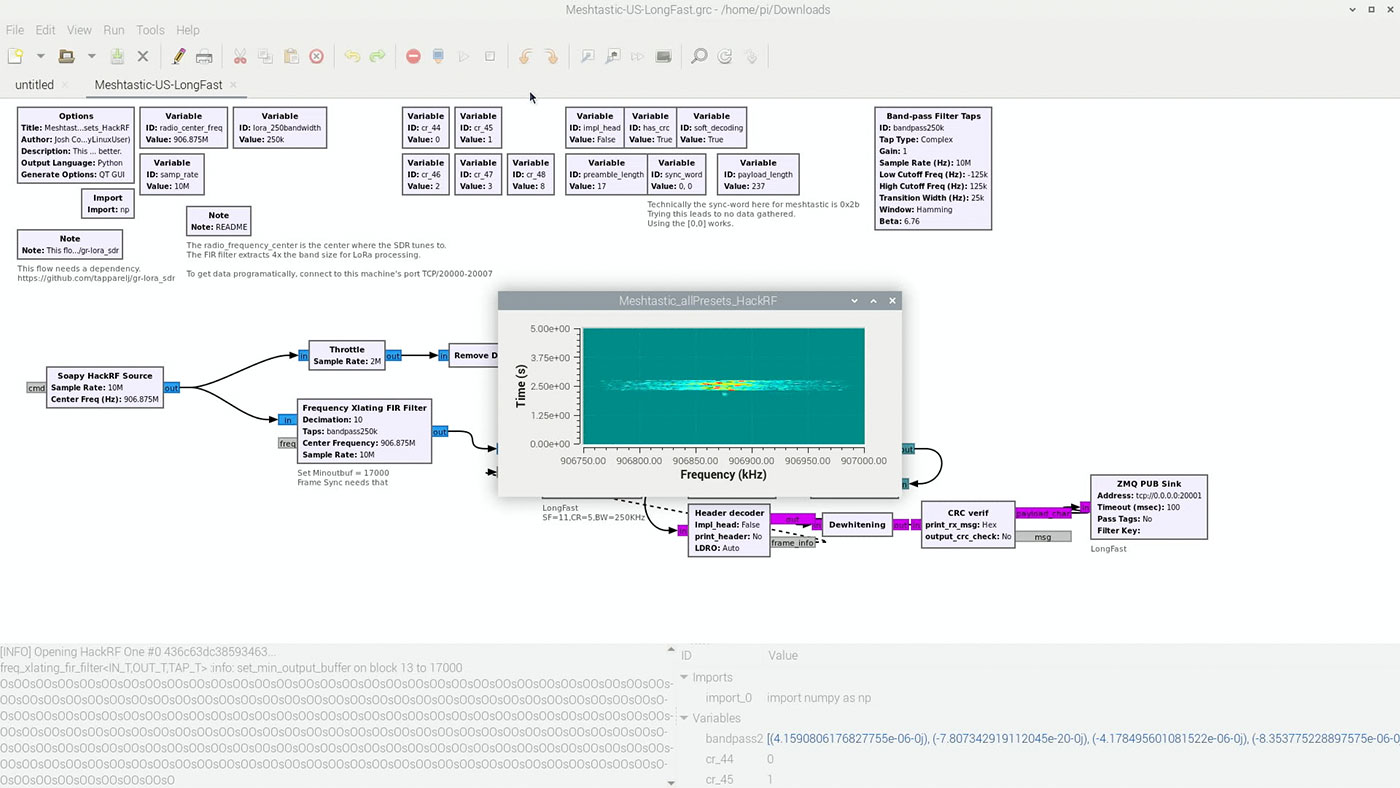
Messing around with settings, I wanted to be able to just see the LongFast channel, zoomed in to observe the waterfall in more detail.
So I filtered down the HackRF Source with a Rational Resampler, and fed that into a QT GUI Waterfall Sink:

If you want to get rid of the center spike in received RF energy like I did in the examples above, you can either install the gr-correctiq plugin (install process is the same as for the gr-lora_sdr repository), or re-tune off the center frequency of the channel you want to observe.
If you want to mess around with other channels, check all the RF settings in the Meshtastic Radio Presets table in the official documentation.
Note: For Open Sauce, the default 'Sauce' channel was running over
SHORT_TURBO.
Decoding Meshtastic messages
Finally, to read the decoded messages, I tried to use the included RX script, but it seems like it is not working correctly, either on Long Fast or Short Turbo:
cd ~/Downloads/meshtastic_sdr/python\ scripts
python3 meshtastic_gnuradio_RX.py -n 127.0.0.1 -p 20004
All I could get was a lot of repeated OsO in GNU Radio's console, and no output in the terminal from the RX script:
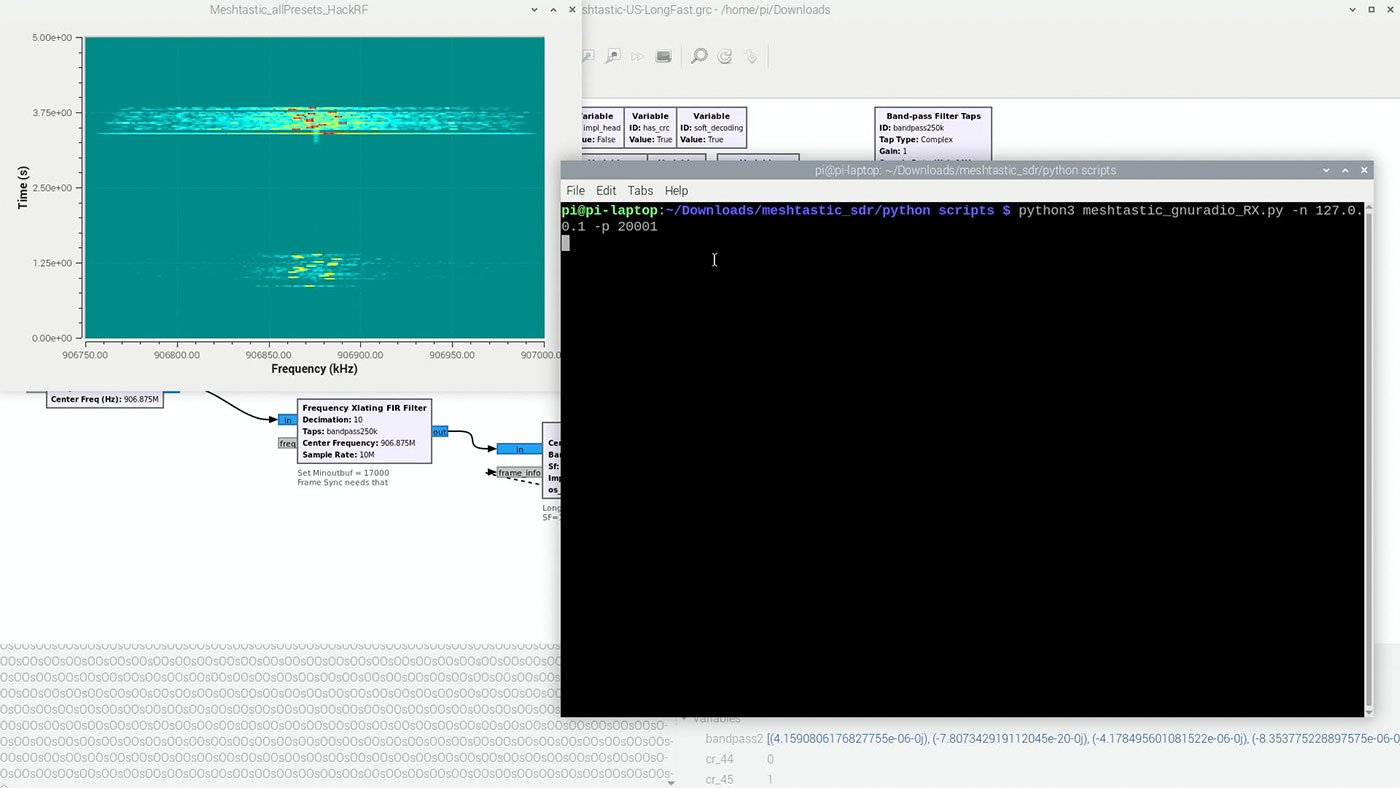
I've opened up an issue (Trouble using RX python script) on the Meshtastic_SDR project, and will continue debugging at some point. Right now I'm moving on to some other experiments, a little disappointed I couldn't replicate cemaxecutor's demonstration from last year.
I'm also attaching the two GRC (GNU Radio Companion) scripts I've been using to test all this out—they are both modified to only look at a single channel, as that was easier on the Pi's CPU. They are by no means perfect and could probably use a little tweaking to make them more performant, or 'work' at all, haha:
Rename the files to end in .grc to open them up in GNU Radio Companion.
Debugging and Library Paths
If you're just getting started with all this stuff, expect to run into problems. From understanding library locations, Python packages, environments, etc... it's all a bit messy :)
If you get an error like:
Traceback (most recent call last):
  File "/home/pi/Downloads/meshtastic_sdr/gnuradio scripts/RX/Meshtastic_allPresets_HackRF.py", line 37, in <module>
    import gnuradio.lora_sdr as lora_sdr
  File "/usr/local/lib/python3.11/dist-packages/gnuradio/lora_sdr/__init__.py", line 18, in <module>
    from .lora_sdr_python import *
ImportError: libgnuradio-lora_sdr.so.1.0.0git: cannot open shared object file: No such file or directory
Then you might not have the lora_sdr module compiled and installed in the correct place. Make sure you used the correct path in the cmake .. -DCMAKE_INSTALL_PREFIX=[path here] command.
To uninstall the library, cd ~/Downloads/gr-lora_sdr/build and run the commands:
sudo make uninstall
sudo make clean
cd ..
sudo rm -rf build
Then re-create the build directory and re-run the install commands above.
If you're using a HackRF One and GNU Radio is having trouble identifying it (e.g. with messages like no hackrf device matches), it might be a permissions issue. Try running lsusb to ensure you can see the device (should be listed as HackRF One), and try running SoapySDRUtil --probe="driver=hackrf" to get device info.
If the latter command does not work, but lsusb showed the device, try running sudo with the SoapySDRUtil command. If that works, try rebooting and see if that fixes the issue.
Comments