The (almost) perfect mini NAS for my mini rack
The GMKtec G9 N150 4-bay NVMe mini PC is $240 and the nearly perfect NAS for my mini rack:

It has an Intel N150 4-core SoC with halfway-decent Intel UHD integrated graphics, 12 GB of LPDDR5 RAM, dual 2.5 Gbps Ethernet, WiFi 6, and the best part: 4 integrated M.2 NVMe slots.
Granted, splitting up the 9 PCIe Gen 3 lanes limits the performance a bit, but there are some things I love about this design:
- Each M.2 NVMe slot gets PCIe Gen 3x2, which is plenty adequate for even a 5 Gbps USB NIC, much less the built-in 2.5 Gbps interfaces.
- The height is just under 1.75", meaning it fits in 1U of rack height.
- It's less than 6" wide, so there's even room for its power supply or another bit of hardware next to it on a mini rack shelf.
GMKtec let me know they could send a unit for testing along with the G3 mini PC I faced off against a Pi last month, and I accepted.
I wanted to see if this could replace my full-size 100 TB hard drive NAS. Since I moved my YouTube operation to a separate studio, I no longer need tens of TB of local storage. I just have a 3 TB media library with movies and TV shows for the family, and 1 TB of backups for the household computers.
So four 2 TB NVMe SSDs would do the trick, in a RAIDZ array (2 TB used for redundancy, so 6 TB of usable space).
I tested the general performance under Windows (Windows 11 was included on the 1TB NVMe SSD it came with) and Ubuntu 24.10 (included on the built-in 64 GB of eMMC storage), and it performs about as well as any other N150 mini PC.
That is to say, noticeably faster than a Raspberry Pi, but much slower than a modern desktop, or even an N305 found in higher-end mini PCs.
You can browse the GMKtec G9 Geekbench 6 benchmarks I ran, but bottom line, the CPU performance was as expected, even if the little fan can't quite keep up under load.
The Problem
The N150 reported temps of 85°C and throttling after a minute or so with s-tui running stress on all CPU cores:
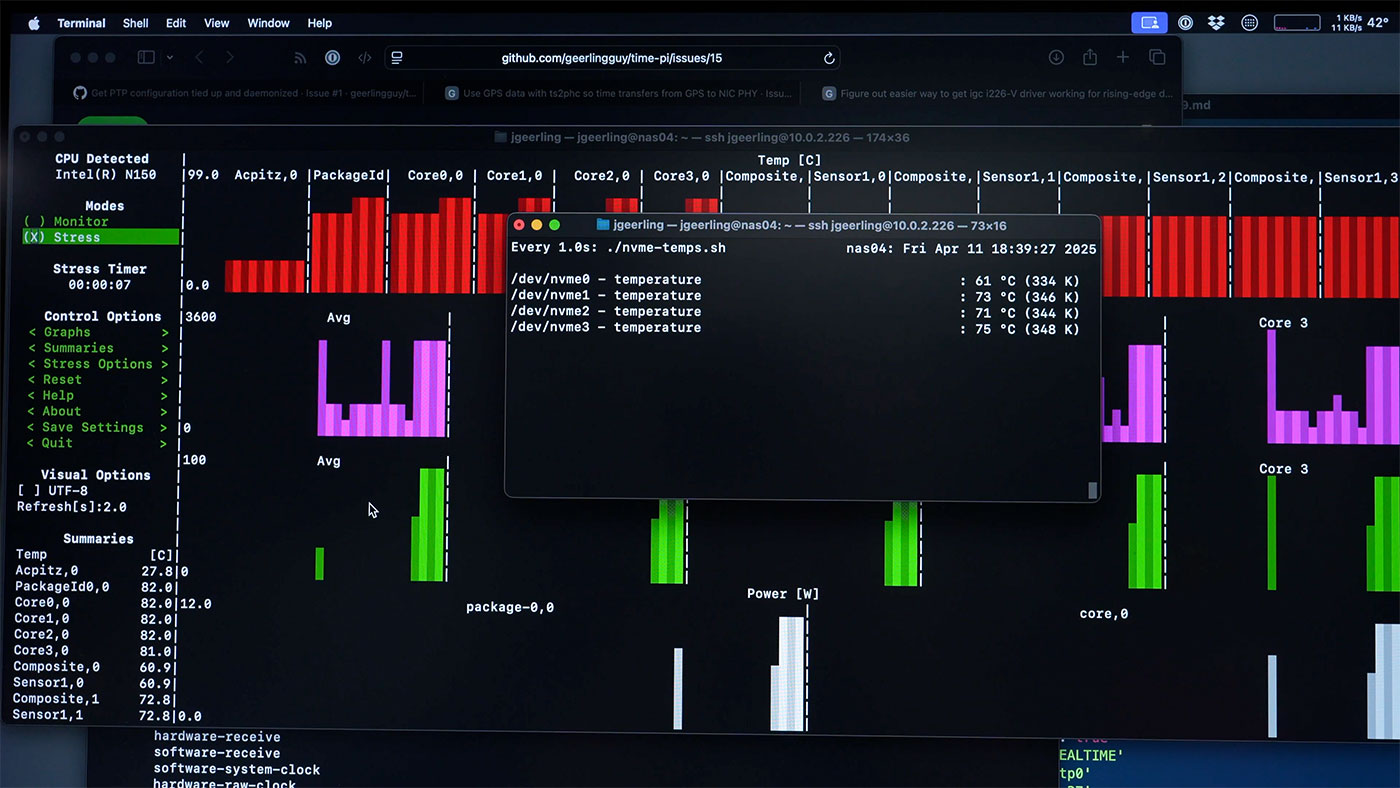
And notice the NVMe SSD drive temps: in the mid-70°C range, _even with no SSD read/write activity!
Granted, this was with some PCIe Gen 4x4 NVMe SSDs, in my case Kioxia XG8s. But I also tested some Inland PCIe Gen 3x4 drives, and those also ran hot. The one closest to the two little drive-bay fans was always 10°C+ cooler than the rest, but the box was like an EZ-bake oven for SSDs.
I pulled out the thermal camera to confirm, and these drives were definitely getting toasty:
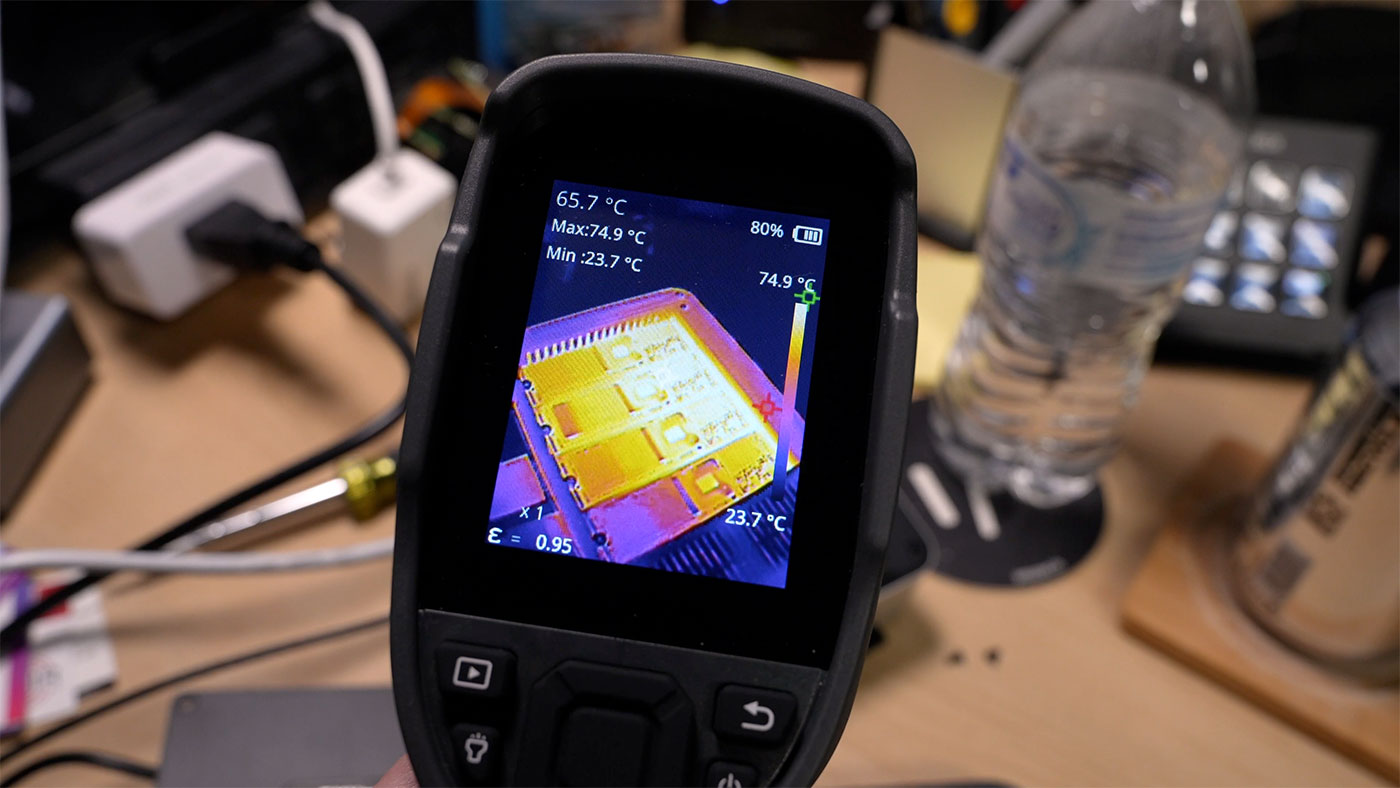
I would be willing to push the thermals (or ramp up the fan speeds a bit to keep thermals in check), were it not for my benchmarking results.
With 1 GB test file sizes, I was having no issues. I was able to read and write at speeds well over 2 GB/sec using a RAID 0 array:
| Benchmark | Result |
|---|---|
| iozone 4K random read | 49.89 MB/s |
| iozone 4K random write | 213.26 MB/s |
| iozone 1M random read | 2115.74 MB/s |
| iozone 1M random write | 2397.68 MB/s |
| iozone 1M sequential read | 2324.73 MB/s |
| iozone 1M sequential write | 2373.47 MB/s |
But if I pushed the test size to 10 GB, the G9 would reboot itself—every time I tested.
I then tested the following configurations, which all resulted in the same outcome (a hard shutdown, then reboot) every time:
- 4 drives, ZFS RAIDZ
- 3 drives, ZFS RAIDZ
- 2 drives, ZFS mirror
It was only when I removed all but the first drive (nearest the cooling fans) that I could achieve greater than 1 GB benchmarks without a hard reboot.
I also tested the 4 and 3-drive configurations with the fans ramped up in the BIOS (thankfully GMKtec does a nice job of exposing all system settings through there, including power profiles), and it was still doing the hard reboots.
When I installed the Inland drives, they worked — but were still running very hot, and would reach into the 80-83°C range while benchmarking.
Solutions
I was hoping to spend some time testing the box in my mini rack instead of just on my desk, but after all the thermal issues—and after finding the network connection wouldn't come up automatically every reboot (sometimes I had to re-plug the Ethernet jack to get a connection under Ubuntu 24.04 LTS)—I decided this might not be the mini NAS for me...
But I did test out a completely-overkill NVMe cooling solution:
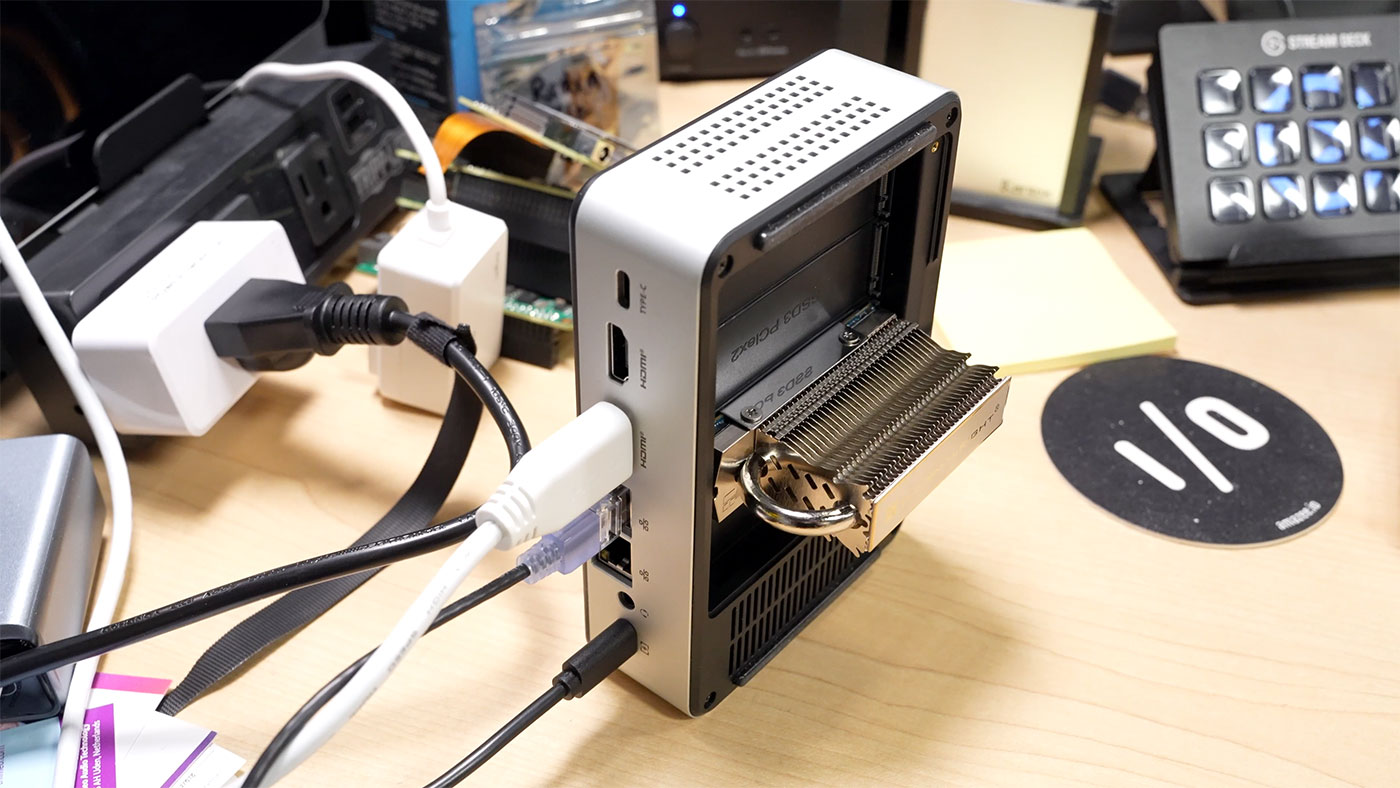
The Thermalright HR-09 2280 PRO is a massively-overkill NVMe SSD cooling solution. But it works: I got the drive temperature down to 30°C at idle, which is a marked improvement over the 73°C before!
The only problem, this is now a 2U mini NAS, and that I cannot abide. Plus, it'd be an extra $50 to outfit all four drives.
And in the end—it didn't seem the hard-reboot problem was related directly to temperatures, but possibly something in the PCIe bus? Maybe CPU temps? The trouble is, heat problems often cause ghosts and gremlins, and for a home NAS—especially one my kids rely on to serve up a fresh helping of Bluey at a moment's notice—I don't want to deal with phantom issues.
Maybe GMKtec could revise the design and make an aluminum cover plate on the bottom which contacts the NVMe drives and increases the cooling capacity? Not sure.
I still think the G9 is an interesting box. I just don't think it's the perfect mini NAS for me.
I have a video where I say much of the same, but with a bit more data and examples (and a demonstration of the fan noise, which is not bad, but is noticeable if it's nearby):
One More Thing
One other thing I've noticed, which I don't care for: GMKtec seems to use product variations to give a ratings boost to newer products like the G9.
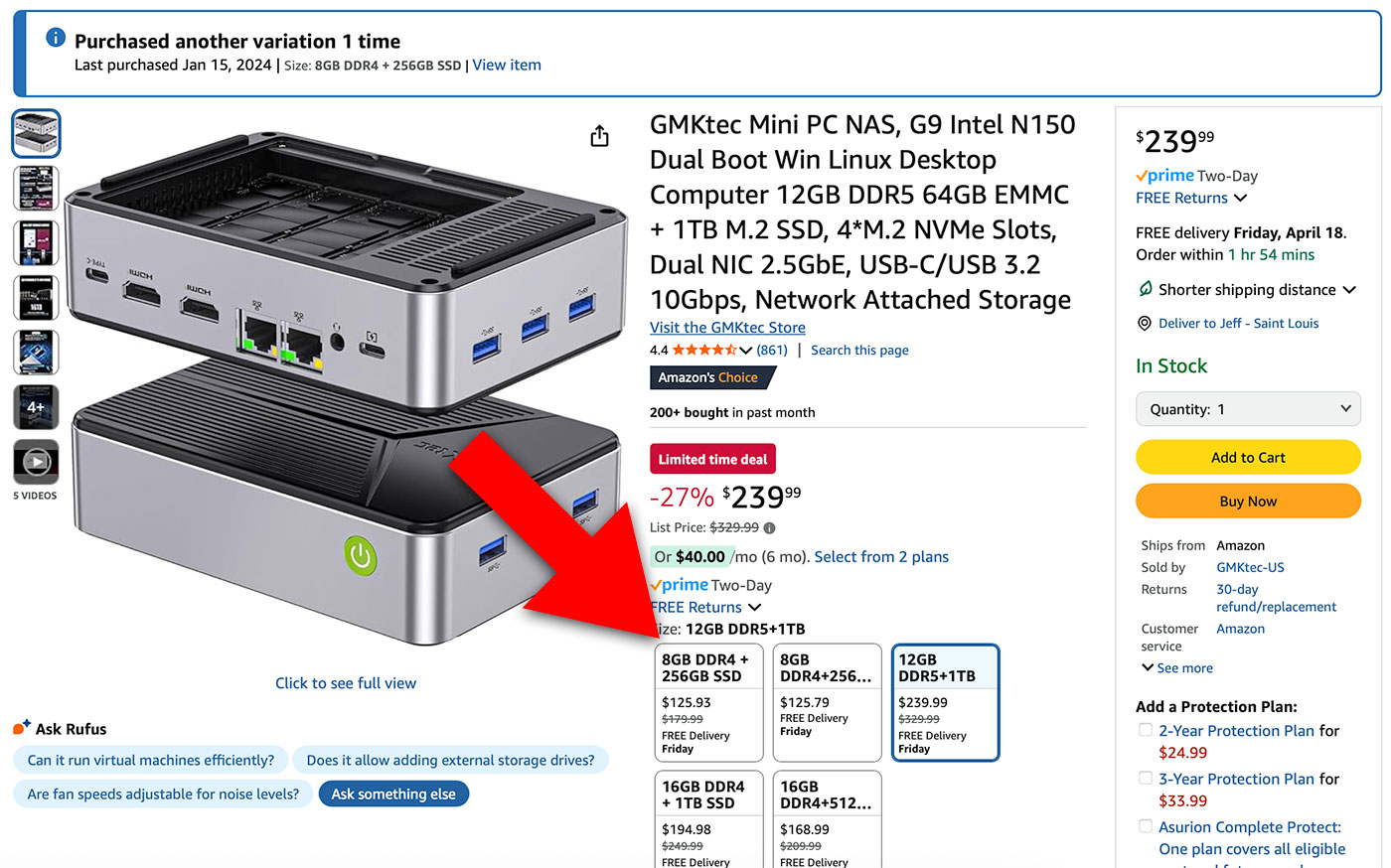
With the red arrow, I highlight all the other product variations on the G9 product page. Those are all for the GMKtec G3, a mini PC that I have personally reviewed (linked earlier in this post) and recommended in the past.
When you go to the G9 listing—which is for what I'd argue is an entirely different product, it's not just a slight tweak to the G3's specs—it still shows almost a thousand reviews from all the G3 buyers.
And the reviews are labeled by variation name, which reads like Size: 16GB DDR4+512GB, so it's impossible to tell at a glance what reviews (if any) are actually for the G9.
I feel like it's a bit of a scummy Amazon marketplace behavior, and a product like the G9 that's pretty good but definitely not as good as the G3 (in my book) is going to have an outsized benefit from casual Amazon buyers.
On top of that, I've been approached a couple times about joining GMKtec's affiliate program, or accepting an invite to a special "10% tier" for Amazon referrals. I've made it clear that besides run of the mill Amazon Affiliates, I do not participate in any affiliate marketing for my YouTube channel (you can see my YouTube policies here).
But running the numbers:
- According to Amazon Associates, people have purchased 53 GMKtec G3s using my link
- $206.52 is what I've earned in general affiliate commission from Amazon
- $826.08 is what I could've earned if I were in the 10% creator bonus referral program...
- (Extrapolate that out to dozens or hundreds of products I mention on my channel... you can see how it would be a massive conflict of interest if I earned 4x more income, just by 'reviewing the right products'.).
I honestly think GMKtec builds decent hardware. Certainly better than the lowest-of-low-end mini PCs.
But little tricks like product-variation-stuffing and substantial 'influencer incentives' turn me off on brands. GMKtec is not the only brand that's like this—and they're quite tame in comparison to the pushy ones. Maybe a good topic of discussion some other time...
Update after two weeks of additional testing
Since publishing this blog post and video, I've heard from a number of other GMKtec G9 users—and it's a mixed bag. Some people have reported no problems after putting heatsinks on their drives and a fan over them. One user has posted a number of comments on the YouTube video saying his system works perfectly with no modification.
But I've had at least 10 people either DM me or comment that their G9s had the same instability, and a few of them have decided to keep the G9 but deploy it with just one drive, while others returned theirs.
I went ahead and bought a 4-pack of NVMe heatsinks, and installed them:
- I put one heatsink on each Kioxia XG8 NVMe SSD
- I removed the bottom plastic cover
- I placed the G9 on its side with the exhaust port 'up'
- I placed a strip of kapton tape along the motherboard edge against the side of the computer to make sure the CPU cooler airflow would exit out of the CPU-side vents, instead of passing back over the NVMe side (the ventilation is choked off significantly by the small amount of holes on that exhaust side).
- I set the CPU power limit in the BIOS to 'Quiet' (instead of Balanced or Performance)
- I disabled the Turbo boost functionality in the BIOS so the CPU wouldn't clock up
- I put a 120mm Noctua fan directly blowing against the open "side" now (the NVMes are on the side, not the bottom)
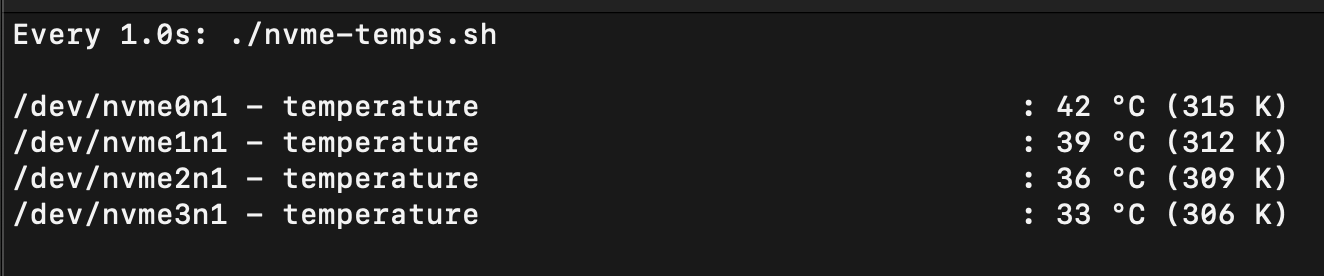
With all that in place, I ran all my benchmarks again, 1 GB and 10 GB file sizes. With the drive temps in the upper 30s (°C), they finally succeeded in a 4-drive RAIDZ array.
So then I did my real-world stress test, and copied a 40 GB video project to it (success!), then I copied the 40 GB video project back off it to my computer while also copying another 20 GB project to it.
And... after about 45 GB of copying... the computer hard-reset again.
I have to imagine it is not strictly a thermal issue—though running the drives at 70-80°C while the CPU is burning at 85°C certainly didn't seem to help. It seems like there could be power issues when running 4x NVMe drives on this system.
Again, I emphasize, for my own needs, I don't want to run a NAS that just hard-resets every now and then when it's under load. I might be able to get around this issue with lower-power NVMe SSDs (the XG8s do consume a little more than cheaper DRAM-less drives...), but I still don't have much confidence. And I don't know if I can stomach another $430 investment into this project (assuming I buy 4x Teamgroup Gen 3x4 2TB NVMe drives).
Final Update
I did buy a set of 4x 2TB NVMe PCIe Gen 3 SSDs, and did a lot more testing besides. Here's a video going through everything in detail—tl;dw is it looks like the chips that are in the un-cooled area on the board are the issue (a burning-hot ASMedia PCIe switch chip, and a couple others around it):
Comments