Upgrading 4G LTE modem firmware is an experience
During my most recent hospitalization, besides making a video about the IV pump, I was messing around with a Raspberry Pi 4G LTE router project I could stash in my hospital go-bag (I am hospitalized about 2.5x per year, on average).

I was testing out a new 4G LTE modem, a Sierra Wireless AirPrime EM7565, which is rated at Cat 12 and theoretically gets hundreds of megabits down. A huge improvement over my previous modem of choice, the Quectel EC25-A.
I already know how annoying it is to work with 4G modems—you basically have to learn a new language, sending magic AT commands over a serial connection to the modem. And most of the guts are proprietary, usually controlled by Qualcomm. And every guide on the Internet differs a bit, because some people use QMI mode, some MBIM, and some really old guides even talk about PPP!
This blog post is a condensed summary of the process of bringing up this modem. For all the gory details, check out this issue in my Pi Router GitHub repo: Work on initial LuCI and hardware configs.
I learned how to use minicom to connect to the modem (e.g. minicom --device /dev/ttyUSB0 --baudrate 115200), and using that utility is a blast from the past! If you thought exiting vim was hard, try exiting minicom while SSH'ed into a Raspberry Pi from a Mac using Terminal!
Alternatively I could have one terminal session open to cat /dev/ttyUSB0 and in another, run AT commands like echo -ne 'AT\r\n' > /dev/ttyUSB0. But that often led to weird characters being inserted when I did that via SSH, causing mayhem. In either case, it feels like computing in the 80s.
I bought my EM7565 used because higher-end 4G and 5G modems are expensive, and I'm from the midwest. I don't buy things new if there's a buck to be saved.
Running the AT command AT!PRIID?, I found out the modem I purchased seems to have come from a Lenovo laptop, probably running Windows.
AT!PRIID?
PRI Part Number: 9907220
Revision: 001.004
Customer: Lenovo-Laptop

Carrier PRI: 9999999_9907259_SWI9X50C_00.06.02.00_00_GENERIC_001.004_000
Windows prefers these modems run in a mode called MBIM, and sometimes they don't even appear in Linux at all. In my case, the modem's USB Product ID was 90b1, which meant Linux's qmi_wwan driver didn't even pick up the modem and register it as a serial device.
root@OpenWrt:~# dmesg
...
[    7.329244] usb 2-3: New USB device found, idVendor=1199, idProduct=90b1, bcdDevice= 0.06
Thanks to Sierra Wireless forum user rspmn, I learned I could force it to use a USB Product ID the qmi_wwan Linux driver will recognize:
# modprobe option
# echo 1199 90b1 > /sys/bus/usb-serial/drivers/option1/new_id
After doing that, the ttyUSB* devices appeared in /dev. But it's a temporary fix: you have to force the modem to persist the new PID using the USBPID command.
AT!ENTERCND="A710"?
OK

AT!USBPID?
!USBPID:
APP : 90B1
BOOT: 90B0

AT!USBPID=9091
OK

AT!USBPID?
!USBPID:
APP : 9091
BOOT: 9090
Good. Now the USB PID persists across reboots. But the process of getting this modem to work with Linux was just beginning. Little did I know I'd spend days trying to get this modem into a working state!
My first attempt to get it to work was to reset it to factory defaults. I did that with the commands:
// Unlock password-protected commands (A710 is the default pw).
AT!ENTERCND="A710"
OK

// Restore the modem to factory defaults.
AT!NVRESTORE=0
!NVRESTORE:

Items Restored:  906
Items Deleted:   272
Items Skipped:   4

OK

// Reset the modem.
AT!RESET
OK
But after resetting the modem, it would no longer show up with a USB TTY device! Apparently when I reset the modem, it started using that old USB PID again. So I had to go through the steps of forcing ID 9091 again.
Once I did that, I compiled a custom build of OpenWRT, and configured a wwan interface in OpenWRT to connect using my SixFab SIM card. This seemed to work... except that I was only seeing TX traffic, and no RX traffic:

Every time I reset the modem, it would connect for 45 seconds, then disconnect:
Sat Aug 20 22:36:24 2022 daemon.info [3589]: <info>  [modem0] state changed (connected -> registered)
Sat Aug 20 22:36:24 2022 daemon.info [3589]: <info>  [modem0/bearer5] connection #1 finished: duration 45s, tx: 0 bytes, rx: 0 bytes
Sat Aug 20 22:36:25 2022 user.notice modemmanager: interface wwan (network device wwan0) disconnected
Sat Aug 20 22:36:25 2022 daemon.notice netifd: Interface 'wwan' has lost the connection
Sat Aug 20 22:36:25 2022 daemon.notice netifd: Network device 'wwan0' link is down
Quite annoying.
After tons of debugging, a few other users (notably, rjocoleman) noticed the firmware on my EM7565 was ancient. Indeed, checking on it, it was from 2017:
AT+CGMR
SWI9X50C_00.06.02.00 f50f0a jenkins 2017/08/25 05:33:58
That set me off on a long rabbit hole trying to update the firmware—first trying Sierra Wireless's fwdwl-litearm64le utility, then using qmi-firmware-update. I had to first try upgrading to the 01.05.01.00 version due to changes in the way Sierra signs their code, but no matter what, it would get to the point of writing the firmware .nvu file... then stop.
And after reading through a ton of forum posts, we came to the conclusion that USB 3.0 (xHCI) was unstable when writing older firmware to the EM7565.
So it was off to Amazon to buy an external NGFF M.2 B-key to USB adapter that I could use to plug the EM7565 into a USB 2.0 port on my Raspberry Pi 4, to try flashing the firmware again.
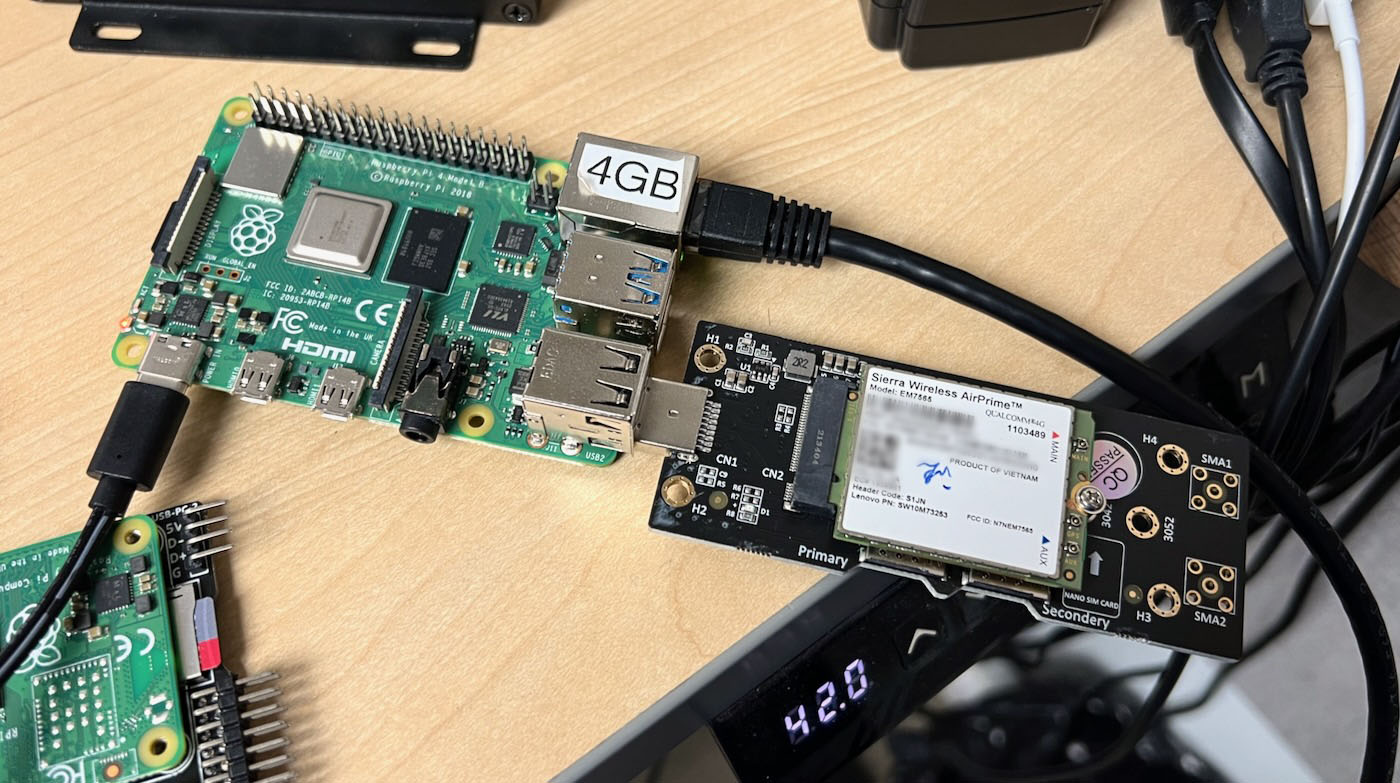
I placed the modem in the board, tried qmi-firmware-update from the Pi 4, and what do you know? It worked!
root@waveshare:/home/pi/swi_fw0105# qmi-firmware-update -t /dev/ttyUSB0 --update SWI9X50C_01.05.01.00.cwe SWI9X50C_01.05.01.00_GENERIC_001.028_000.nvu
loading device information before the update...
setting firmware preference:
  firmware version: '01.05.01.00'
  config version:   '001.028_000'
  carrier:          'GENERIC'
rebooting in download mode...
download mode detected
downloading cwe image: SWI9X50C_01.05.01.00.cwe (80.2 MB)...
finalizing download... (may take several minutes, be patient)
successfully downloaded in 99.67s (804.8 kB/s)
downloading cwe image: SWI9X50C_01.05.01.00_GENERIC_001.028_000.nvu (3.9 kB)...
finalizing download... (may take several minutes, be patient)
successfully downloaded in 0.05s (79.2 kB/s)
rebooting in normal mode...
normal mode detected
...
...but it also reset the USB PID again, so I had to re-reset that so I could then update the firmware again to the latest version. I did that twice because apparently if you update from the 01.05.01.00 version to the latest version only one time, it could get the modem stuck in 'low power mode'. Why? No clue.
Sometimes with these modems you don't question it: just roll with what the people who seem to know what they're doing say.
So now, the modem is finally running the latest firmware:
   new firmware revision is:
      SWI9X50C_01.14.13.00 883709 jenkins 2022/01/05 07:08:35
   new running firmware details:
      Model: EM7565-9
      Boot version: SWI9X50C_01.14.13.00
      AMSS version: SWI9X50C_01.14.13.00
      Carrier ID: 1
      Config version: 002.048_000
   new firmware preference details:
      image 'modem': unique id '002.048_000', build id '01.14.13.00_GENERIC'
      image 'pri': unique id '002.048_000', build id '01.14.13.00_GENERIC'
Does it work? Can I get a custom compiled OpenWRT build working (there's a great OpenWRT compile guide video here, btw)? Don't know yet. I'll keep working on it, and hopefully will have it ready for a video on my YouTube channel soon!
Comments