M.2 on a Raspberry Pi - the TOFU Compute Module 4 Carrier Board
Ever since the Pi 2 model B went to a 4-core processor, disk IO has often been the primary bottleneck for my Pi projects.
You can use microSD cards, which aren't horrible, but... well, nevermind, they're pretty bad as a primary disk. Or you can plug in a USB 3.0 SSD and get decent speed, but you end up with a cabling mess and lose bandwidth and latency to a USB-to-SATA or USB-to-NVMe adapter.
The Pi 4 actually has an x1 PCI Express gen 2.0 lane, but the USB 3.0 controller chip populates that bus on the model B. The Compute Module 4, however doesn't presume anything—it exposes the PCIe lane directly to any card it plugs into.

And in the case of Oratek's TOFU, it's exposed through an M.2 slot, making this board the first one I've used that can accept native NVMe storage, directly under the Pi:
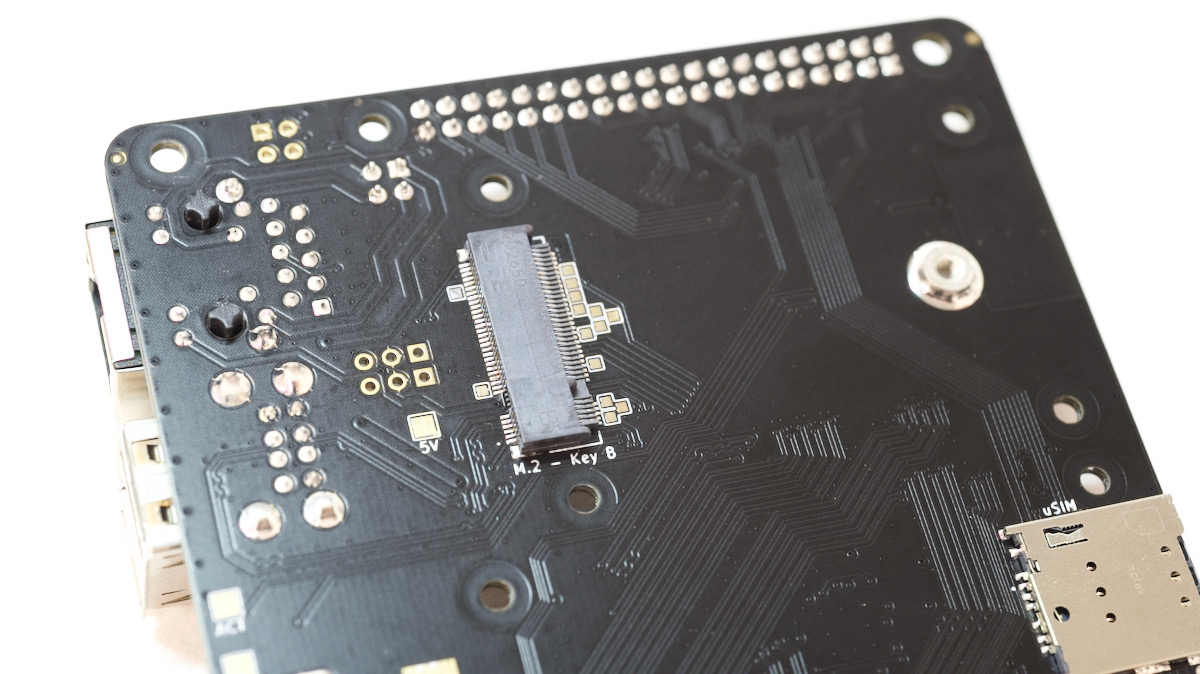
Now, a single x1 lane at gen 2 speeds tops out around 400 MiB/sec in real-world usage, so many NVMe drives are still underpowered connected to the Pi, but as you'll see in a bit, a cheap KingSpec SSD was 3x faster for random IO than a similar SSD plugged in via USB 3.0.
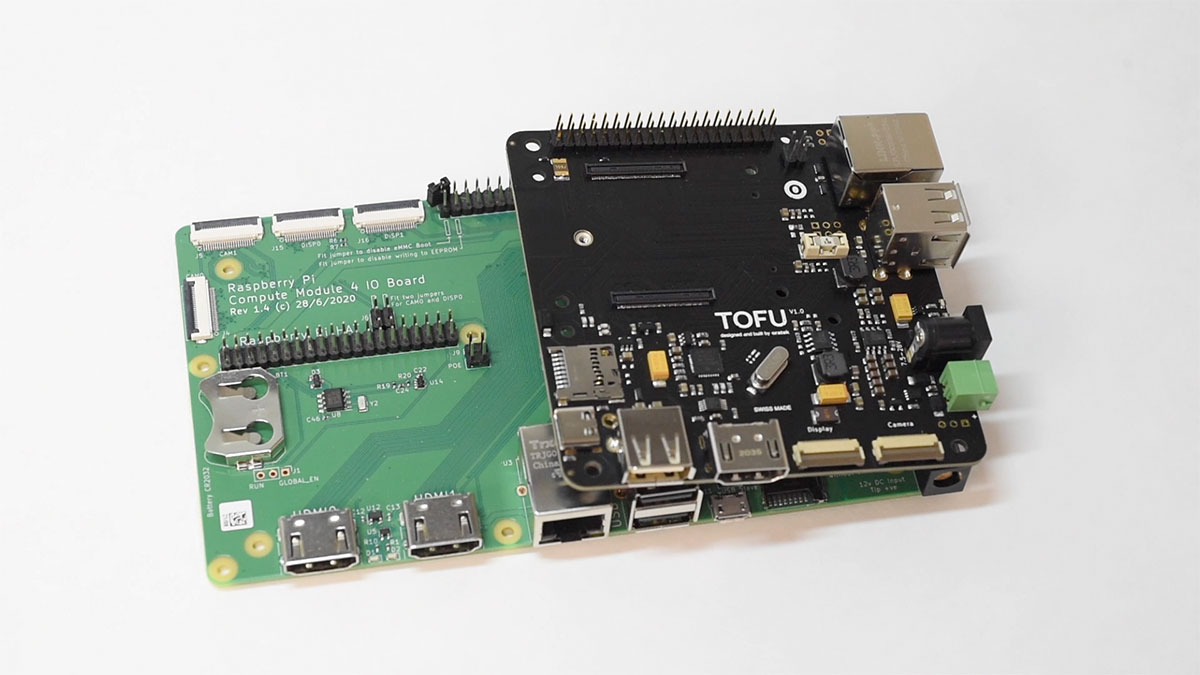
I'd like to thank the Swiss company Oratek for sending me this TOFU board. The board is just 9 centimeters square, yet packs in most of the same features on the much larger Compute Module 4 IO Board:
Video review
I also posted a video that goes along with this blog post on my YouTube channel:
M.2 on a Pi
Let's start on the bottom, and take a look at the M.2 slot on the TOFU. Some other Compute Module 4 boards I've been keeping my eye on are designed around the more popular 'M key' slot in the 80mm form factor.
Other boards have 30mm 'A+E' key slots, that accept things like the Google Coral TPU, or WiFi 6 cards like the Intel AX200 I tested.
But the TOFU has a 'B' type M.2 2242 socket, meaning it accepts only B or B+M key devices.
And the slot on this board only has one standoff at 42 millimeters, so you can't fit shorter devices like a 30 mm 'B+M key' NVMe, like the WD SN520. Of course, if you taped it down it would work, but that's not a great solution:
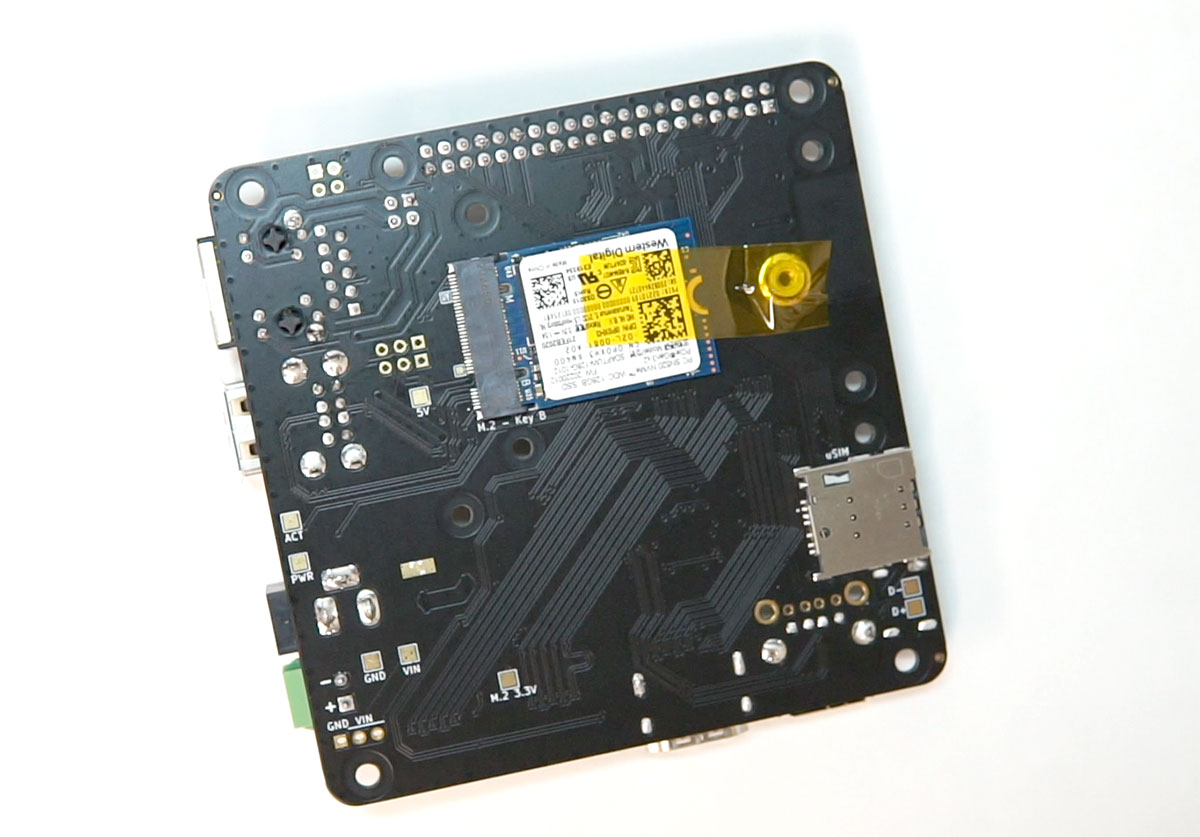
But 42mm devices work great, as long as driver support is present on the Pi—and for NVMe drives, at least, Pi OS includes support out of the box.
I bought a KingSpec 128GB 2242 NVMe drive, and after installing it, it showed up using lsblk, and I could format and mount it like any other drive.
I compared this setup to a similarly-priced SSD I reviewed in the Argon One M.2, which connects an SSD inside the same case as a Pi 4, but using a USB 3.0 to SATA adapter.
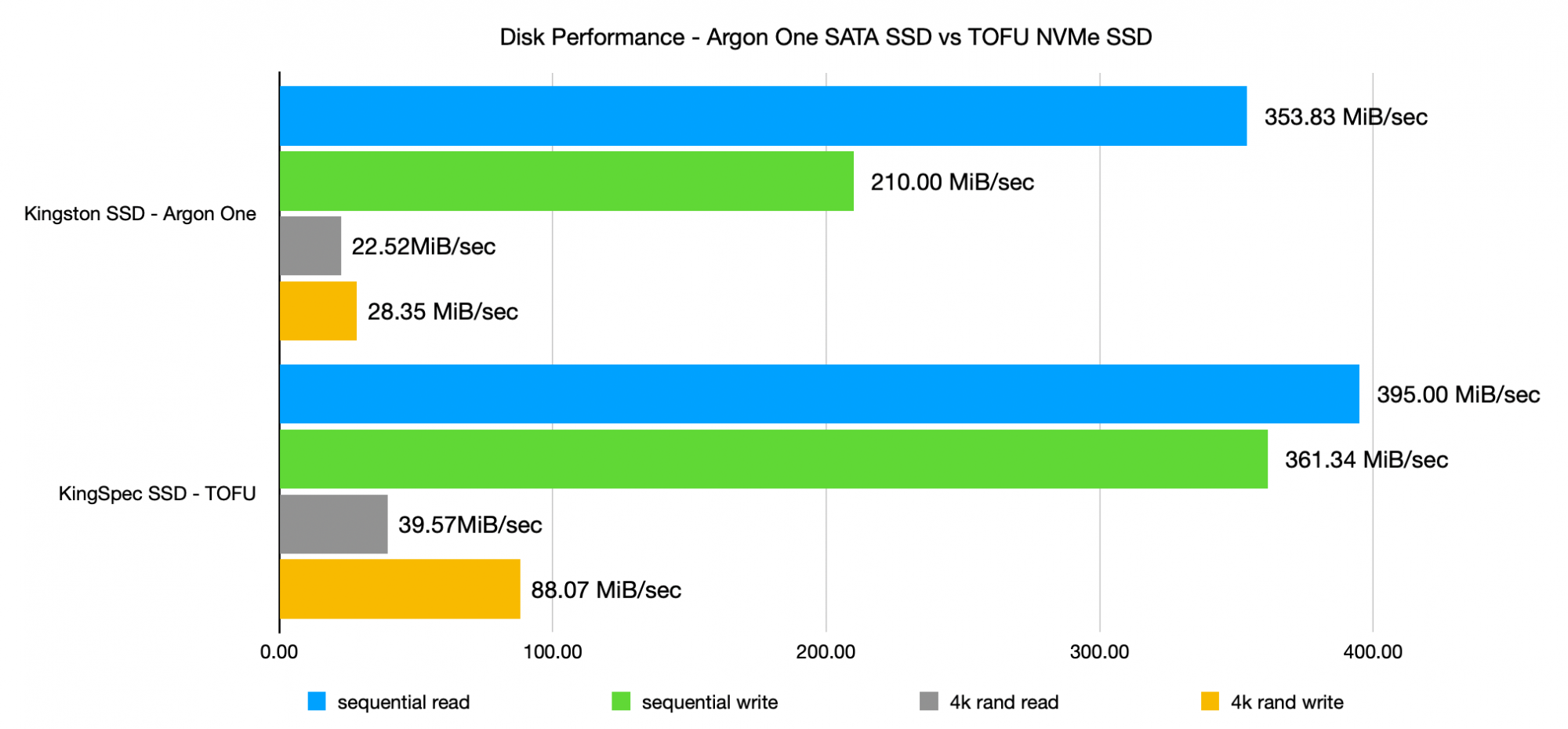
Since the NVMe drive communicates directly over the Pi's PCI express bus, it performs much better on every benchmark.
And yes, the two drives are not the exact same; but after testing a few dozen SATA SSDs and NVMe drives, both natively and through USB adapters, I can say with confidence that the USB adapters soak up at least 10-20% of the bandwidth, and it's worse for random IO, which requires better latency. Direct SATA and NVMe connection is a lot faster, plus cabling (especially for NVMe... where there is none) is a lot cleaner.
Unfortunately, you can't boot off an NVMe drive—at least not yet. The Pi's firmware needs to be updated to support this feature. It seems like it may happen, but there's no timeline for it yet.
Update: Apparently this week NVMe SSD Boot was just added as a beta feature in the Pi firmware, though it requires a bit of a process to use it: NVMe SSD Boot (BETA).
NVMe drives are only one of the accessories you can install on the TOFU, though. What it's really designed for is a 4G LTE module, like a Sierra Wireless AirPrime. The TOFU includes a built-in SIM tray, so you can get mobile service on the board.
Industrial Use
As more industrial systems require more Internet connectivity, it's important to make robust control boards with both wireless and wired networking. And the Raspberry Pi Compute Module is a great platform to build on, since it can run a full Linux OS and is easy to remotely administer.
The TOFU has another feature that's extremely useful in industrial settings: It accepts a wide range of power inputs.
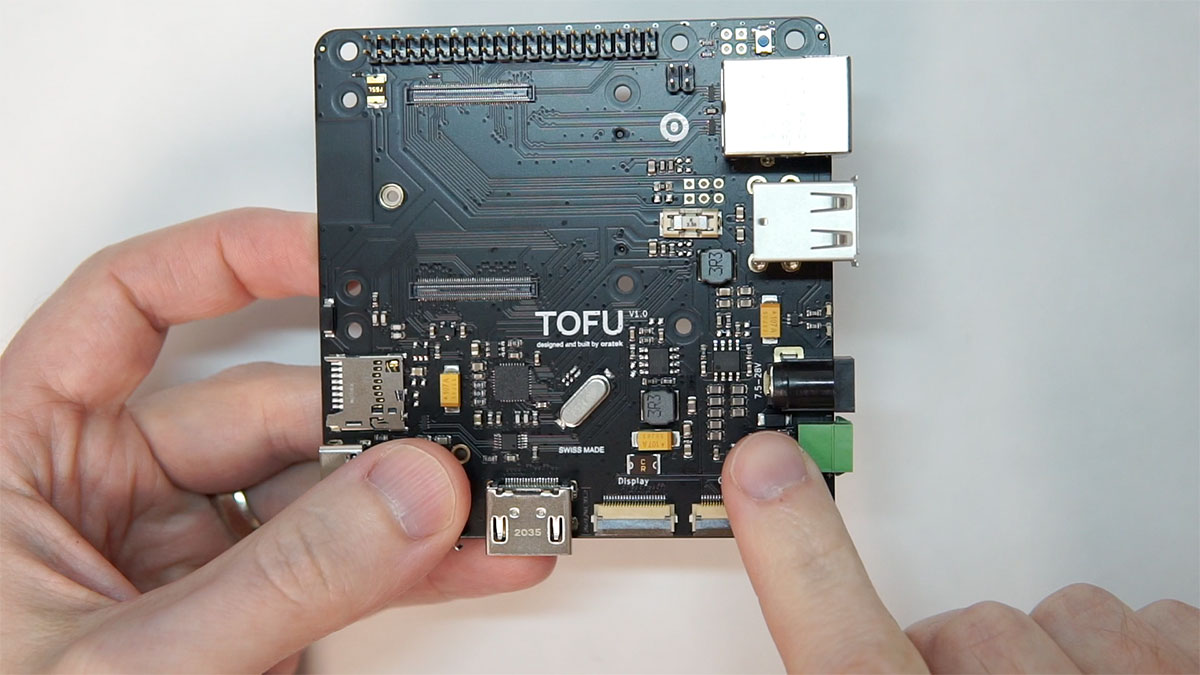
You can either use a barrel plug (like the regular Compute Module IO board) or a 3.5mm terminal block, and power the board with between 7.5 to 28V of DC power.
It also includes a 5 volt, 3.5 amp fuse to protect against overcurrent, and also supports Power over Ethernet through the standard Pi PoE HAT, since it includes the extra four pins used to extract power from the ethernet connector and deliver it to the HAT.
Feature Overview
Outside of commercial use, the $100 dollar price tag is a little high for the 'impulse buy then stick it in a drawer' use case most of us using Pis are familiar with.
But it's a great, compact board for things like Pi clusters, remote camera installations, or an interactive display system.
It preserves most of the ports you would get on a full size IO board in half the space, including:
- 1 CSI camera connector
- 1 DSI display connector
- 1 full-size HDMI port
- 3 USB 2.0 ports (which need to be enabled to work)
- 1 Gigabit Ethernet port
- 40-pin GPIO header
- microSD slot (only usable with CM4 Lite)
- 1 USB-C port (used for flashing CM4 eMMC models—hold down the 'boot' button while plugging into a host computer)
If powering the board via PoE or USB-C, the power lines to the M.2 slot are disabled, since these power methods can't guarantee enough current for the M.2 spec—to use an M.2 slot you still need to power the board through one of the 12V options.
On the bottom, there's:
- 1 M.2 2242 slot
- 1 microSIM slot for wireless cards
A case for the TOFU
Oratek was kind to provide the TOFU carrier board, but so far they don't have a case for it. That's something they may be offering in the future, but for now, I wanted something to house the board on my desk, so I designed my first-ever 3D object: a case for the TOFU.
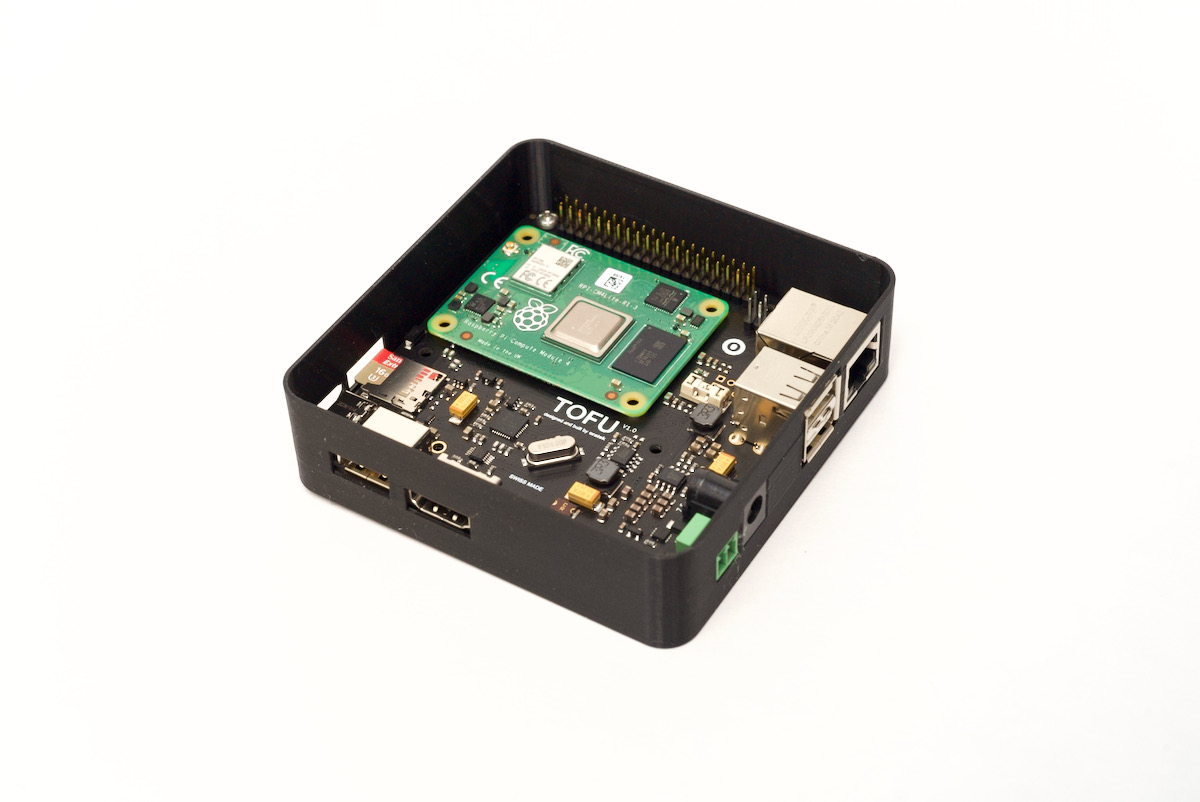
I built it in Fusion 360 following Shawn Victor's great PCB case design tutorial, and printed it on my Ender 3 V2 printer. I had to go through a few revisions before I got to the final form, but it is a nice little enclosure, about the same size as the Argon One M.2 I mentioned earlier.
I posted the case design to Thingiverse: TOFU Enclosure by geerlingguy
Someday I'll learn how to make a top for the enclosure with a cutout for a fan to cool the TOFU. For now, it just looks nicer and protects the bottom of the TOFU, where the SSD is exposed.
Conclusion
At over $100 shipped to the US, I don't expect everyone to go out and buy one of these things. But I like the design of the board, and there are some applications where it is a great value, like for remote installations, using solar power and a battery, for camera surveillance or remote monitoring or control.
You can pre-order the TOFU at tofu.oratek.com, and see all the Compute Module 4-based boards I've been tracking on my Pi PCI website.
Comments