I built a $5,000 Raspberry Pi server (yes, it's ridiculous)
When I heard about Radxa's Taco—a Raspberry Pi Compute Module 4-powered NAS/router-in-a-box—I knew what must be done.
Load it up with as much SSD storage as I can afford, and see what it can do.

And after installing five Samsung 870 QVO 8TB SSDs and one Sabrent Rocket Q NVMe SSD—loading up every drive slot on the Taco to the tune of 48TB raw storage—I found out it can actually do a lot! Just... not very fast. At least not compared to a modern desktop.
Special thanks to Lambda for sponsoring this project—I was originally going to put a bunch of the cheapest SSDs I had on hand on the Taco and call it a day, but with Lambda's help I was able to buy the 8TB SSDs to make this the most overpowered Pi storage project ever!
What can it do?
Well, for starters, ZFS on the Pi is now easy. I wrote an entire ZFS-on-Pi guide here; you install the Pi kernel headers, then apt install zfs-dkms zfsutils-linux and you're on your way.
And with the Compute Module 4's exposed PCI Express Gen 2.0 lane, you can use a decent SATA controller (the Taco uses JMicron's JMB585) and put as many SATA III drives as you want on the bus.
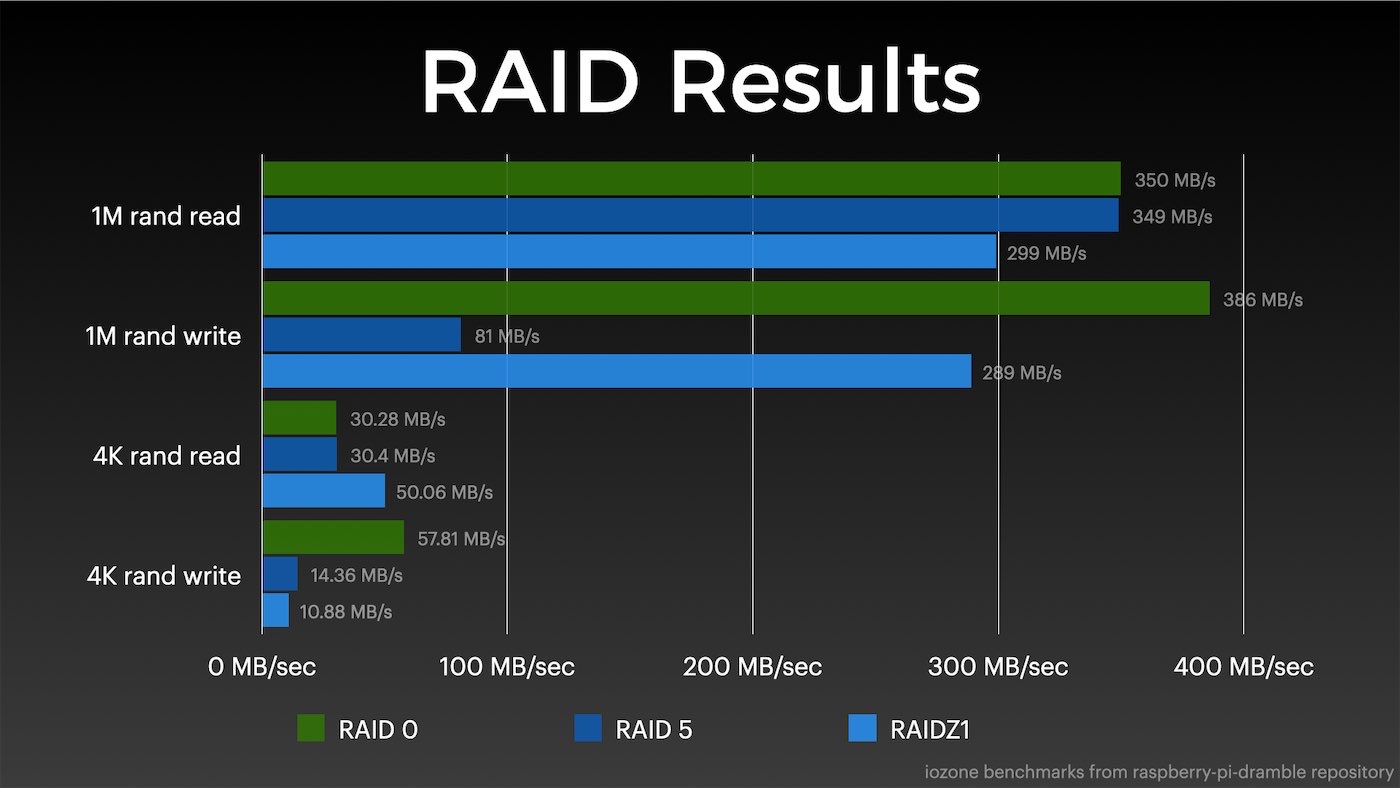
Sadly, the Pi's bus being only Gen 2 and x1 means you're quite limited in terms of bandwidth, though. All RAID levels (including RAIDZ1) basically maxed out the Pi's bus on sequential reads:
And of course, that Sabrent NVMe drive is quite bottlenecked, also only seeing a few hundred megabytes per second of throughput in the best case.
I was pleasantly surprised with how well ZFS performed, though—I initially thought a RAIDZ1 would be slower than a typical mdadm-based RAID5 array, but it actually performed better in many cases.
But better's still not amazing, since the Pi's (relatively) anemic CPU throttles pretty much everything from the past decade, since PCI Express Gen 3 was a thing.
Networking too
The Taco has another trick up it's sleeve, though (two, in fact)—since they are already using an ASMedia PCIe switch chip to split traffic between an M.2 NVMe slot and the SATA ports, they also placed a Realtek 8125b 2.5 Gbps Ethernet NIC onboard—so you get a 2.5G Ethernet port (in addition to the Pi CM4's built-in 1 Gbps NIC).
And to top that off, they'll also include a second M.2 slot—this time E-key—so you could add a WiFi 6 chip, or a machine learning accelerator, like Google's Coral TPU (note: drivers for the latter aren't working on any Pi yet, but new CM4-compatible boards may have a better shot!).
Anyways, I had to install Realtek's driver to get it running, but I found out the latest Pi OS kernel and firmware actually support Realtek chipsets out of the box now—no word yet on when that'll trickle down to a stable build (right now you have to run rpi-update to get it).
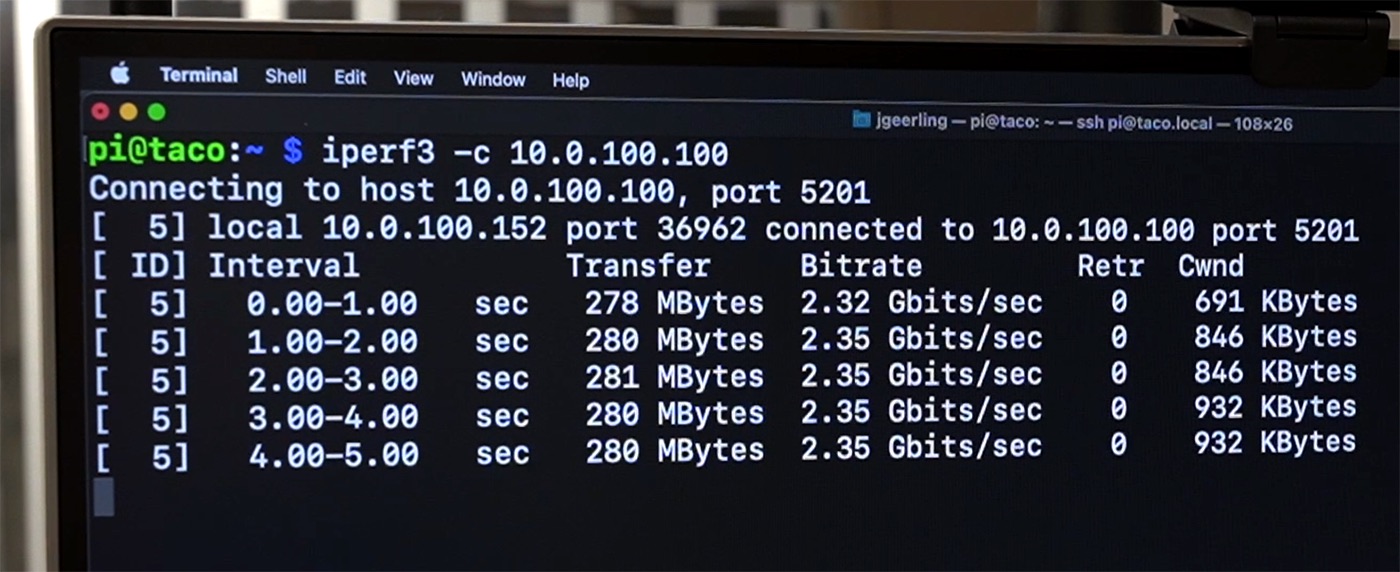
I tested the 2.5G network throughput and didn't have any trouble saturating my home network at 2.35 Gbps both ways to my other high-speed devices.
Having 2.5G networking and a bunch of SATA drives, I also tested Samba file copy performance on the various configurations:
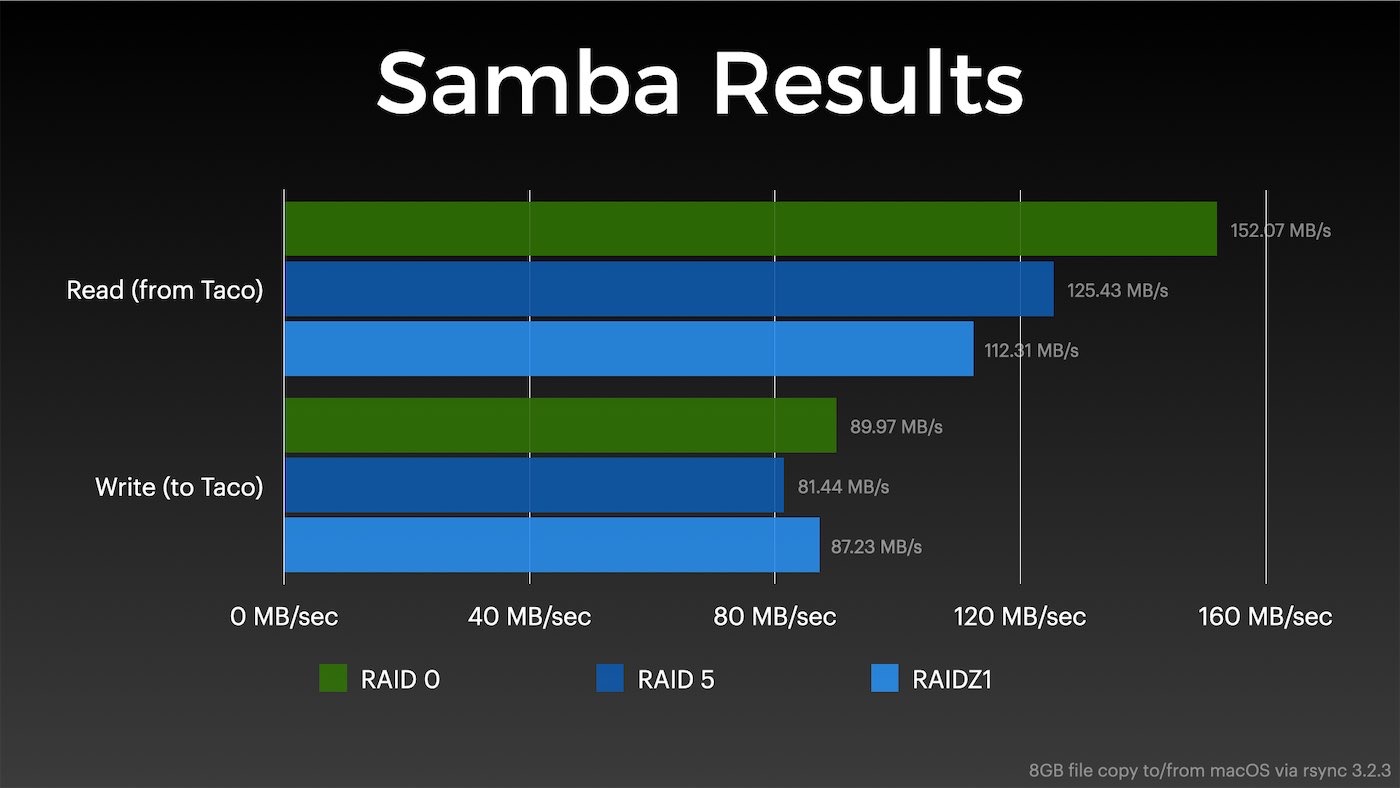
And here's where the Pi's story falls apart a little—and why it's probably best to throw higher-speed storage at a processor able to keep up. Because the CPU is bottlenecking the RAID parity calculations already, the interrupts that hit when network traffic goes up results in a lot lower performance than you might expect.
I think the ideal setup for a Pi-based storage device would be low-end SSDs (or even 3.5" HDDs—they work with the Taco too, though you will need SATA/power extension cables), and RAID 1 or RAID 10 (or ZFS stripe+mirror). That way the Pi's CPU will be free when it comes to putting through more network traffic.
Over gigabit networks, the Pi is perfectly adequate, but I like to go big or go home, so I target 2.5G (minimum) for all my new gear.
It remains to be seen whether any of the higher-end cards I've been testing might be able to transfer data direct from storage to the network (and vice-versa). Supposedly this is A Thing™ with some Mellanox and Intel network cards and NVMe storage, but it's not clear if that's something that requires deeper PCI Express system support that's not implemented on the Pi.
Taco Availability and the CM3
Unlike many projects I've looked at this year, the Taco (board only) will be available for sale soon—by the end of this year—for under $100. And a full kit with the board, a nice metal case, and a CM4 will be available early next year for $200.
And in other interesting news, Radxa also sent me one of their CM3 boards with the Taco. It's basically a drop-in replacement for the CM4 that uses a higher-clocked Rockchip RK3566, and might solve some of the PCIe trouble I've had with the CM4.
Check out my video for a full review of the Taco and some more tidbits that I left out of this post for brevity's sake:
Comments