Raspberry Pi microSD card performance comparison - 2019
Note: I also posted a separate review of some A2 'Application Performance' class cards, see this post: A2-class microSD cards offer no better performance for the Raspberry Pi.

As a part-time tinkerer and full-time developer, I have been fascinated by single board computers (SBCs) since the first Raspberry Pi was introduced almost a decade ago. I have owned and used every generation of Raspberry Pi, in addition to most of the popular competitors. You can search my site for tons of articles on these experiences.
One thing that is almost universally true (at least as of 2019) is that the most common system boot device is a microSD card. SD cards in general have performance characteristics that pale in comparison to faster devices, like NVMe SSDs, eMMC, and XQD or CFexpress.
On top of that, the performance metrics used in microSD marketing are usually targeted only at the major market for these tiny memory chips: those who record video and stills on them, and only ever really care about massive file read/write performance.
For general purpose computing—which is what SBCs like the Raspberry Pi do—random I/O performance is much more important. And here is where most of even the most expensive microSD cards fall incredibly short.
The Benchmarks
If there's one thing I hate, it's blog posts that require you to read a novel before getting to the meat. Therefore, before going further, here are the 2019 benchmarks, run on a brand new Raspberry Pi 4 model B (1 GB RAM), using the official Raspberry Pi USB-C power supply:

As with previous years, and again to get right to the point, here are my recommendations for a microSD card for your Pi:
- Samsung Evo+ - $8 on Amazon
- SanDisk Extreme - $10 on Amazon
The Evo+ is one of the lowest-priced microSD cards (less than ten USD on Amazon right now), and it has either the best or near-best performance for every metric. And it's almost double the best performance of the 2nd place contender, the Samsung Pro+ (which costs a lot more).
Some cards cost a lot more, yet offer less than half the write performance. Note that these 'super fast' cards are often faster when writing large files or streaming data to/from the cards... but whatever optimizations they do for that performance seem to negatively impact random write performance.
You can find all the raw data, and benchmark methodology (as well as a link to the script used to run the benchmark on the Pi) on the official Raspberry Pi Dramble website: Raspberry Pi microSD Card Benchmarks. You can also run the benchmark on your own Pi using the following command:
curl https://raw.githubusercontent.com/geerlingguy/raspberry-pi-dramble/master/setup/benchmarks/microsd-benchmarks.sh | sudo bash
Why are microSD cards so slow at 4k I/O?
Earlier in the post, I mentioned that microSD cards are often marketed based on their maximum throughput. The 'C10' or 'U3' designations typically represent a speed class like "10 MB/sec" or "30 MB/sec" write, respectively. But this is with large video data chunks, which are fairly easy to optimize for in cheap mass-produced flash controllers.
But when you look at random 4K I/O (which is 4 kilobyte blocks of data, written to random segments of the flash drive), the performance is vastly reduced. Instead of seeing the "95 MB/sec" that's advertised on the front of the Sony microSD card, for example, I found 0.66 MB/s write speed when writing random 4K blocks.
I don't blame the manufacturers here, because probably 90-95% of those buying these cards are not using them as the main system boot volume on a Linux computer, as you and I do :)
But it would be nice to see random I/O metrics somehow reflected in flash card datasheets. It's often impossible to get that data, which is why I do these now-annual blog posts!
Raspberry Pi 4 microSD performance improvements
I was most excited to see the I/O improvements in the Raspberry Pi 4, which I felt were long overdue. For a few years, competitors like the Asus TinkerBoard and OrangePi had more dedicated bandwidth to support faster I/O on the network bus, USB ports, and the microSD card reader. The Pi, for years, has had a very limited amount of bandwidth, shared amongst all of the above.
The Pi 4 does much better with all the cards I tested. While random read/write performance is not much better (this is because of the card much more than the Pi), the maximum throughput with large files and streaming data has improved dramatically:

The Pi 4 reads and writes data to all the cards I tested faster than the 3 B+ even when the 3 B+ microSD card was overclocked!
USB 3.0 on the Raspberry Pi 4
I was hoping for, but not expecting, USB 3.0 on the Pi 4, so I was very happy to see it make the cut. USB 3.0 offers a theoretical maximum throughput of 625 MB/sec; the Pi can't quite make it that high, but can sustain over 300 MB/sec of read/write bandwidth.
Currently, the Pi 4 can't directly boot off an external USB 3.0 drive—instead, you can kind of hack around and get the boot partition on the microSD card, with the root Linux filesystem running on an external drive. Once it's possible to boot without a microSD card at all (this should be possible after a future firmware update), an external SSD will offer an incredible speed boost akin to going from a spinning HDD to an SSD.
I did run some tests with a 512 GB Samsung 860 Evo SSD I had laying around, with a USB 3.0 to SATA adapter, and here are the results:

One thing I noticed at first was my tests with the external USB drive were wildly inconsistent. And on a Pi, I have learned that usually means one thing: something's getting really hot, and throttling the speed. I pulled out my Flir camera, and sure enough—the VLI VL805-06 USB 3.0 controller chip was getting quite toasty (the crosshair is directly on top of the chip in the thermal image below):
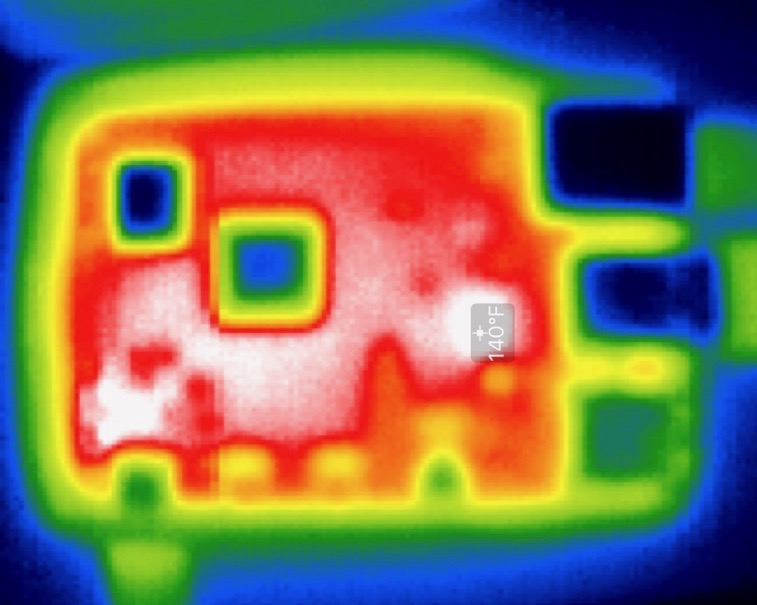
If you want to do anything that requires more than infrequent bursty performance on the Pi, you need active cooling. The benchmarks I ran were fairly consistent when I had a fan directly above the board, but would get very slow (sometimes 2-3x slower) if I had no air passing over the device.
Conclusions
This is one of three major posts I plan on writing about the Pi 4—I am working on a deeper review of the device, with many more interesting observations, as well as a post about running my Kubernetes cluster (sneak peak at www.pidramble.com).
Comments