The ASUS Tinker Board is a compelling upgrade from a Raspberry Pi 3 B+
I've had a long history playing around with Raspberry Pis and other Single Board Computers (SBCs); from building a cluster of Raspberry Pis to run Drupal, to building a distributed home temperature monitoring system with Raspberry Pis, I've spent a good deal of time testing the limits of an SBC, and also finding ways to use their strengths to my advantage.

ASUS sent me a Tinker Board late last year, and unfortunately due to health reasons, I had to delay working on a review of this nice little SBC until now. In the mean time, the Raspberry Pi foundation released the Pi model 3 B+, which ups the ante and also negates a few of the advantages the more expensive Tinker Board had over the older model 3 B (not +). I just posted a comprehensive review of the Pi model 3 B+, and am now posting this review of the Tinker Board to compare and contrast it to the latest Pi offering.

Here's a really quick overview of how the two models stack up:
| Raspberry Pi model 3 B+ | ASUS Tinker Board | |
| CPU | Cortex-A53 Quad Core @ 1.4GHz | Cortex A17 Quad Core @ 1.8GHz |
| RAM | 1 GB LPDDR2 (900 MHz) | 2 GB LPDDR3 (dual channel) |
| GPU | Broadcom VideoCore IV @ 400 MHz | Mali-T764 @ 600MHz |
| Network (LAN) | 10/100/1000 Mbps (~230 Mbps real world) | 10/100/1000 Mbps |
| Network (WiFi) | 2.4GHz or 5GHz 802.11n/ac | 2.4GHz 802.11n |
| Audio interface | 48kHz / 16 bit | 192kHz / 16 bit |
| GPIO | 40 pin header (not color coded) | 40 pin header (color coded) |
| Price | $35 | $49.99 |
I'm leaving out a lot of other specs that don't affect my day-to-day usage of an SBC, but what really stands out to me—and what may still make the Tinker Board worth the extra $15—is the slightly higher-clocked CPU and GPU, the faster onboard networking (which isn't crippled by being shared with the USB 2.0 bus like on the Pi), and double the RAM. The color-coded GPIO pins are a nice bonus, too, as I spend less time fumbling around counting pins on the Pi's unmarked header when experimenting with GPIO projects.
My initial impressions of the Tinker Board hardware are very good; the hardware is almost a perfect match to the layout of the Pi model 2 B, 3 B, and 3 B+—enough so that the Tinker Board fit in all my Pi cases. Note that the CPU seems to stand off ever so slightly higher than the Pi's, so some cases with active cooling (e.g. a fan) might not fit the Tinker Board perfectly (one of my cases wouldn't clamp down all the way).
But as with many other SBCs, the software support is where the rubber meets the road, so let's dive in and see how things stack up!
Getting started with the Tinker Board
The process for getting the OS onto a microSD card is exactly the same as the Raspberry Pi's Raspbian or most other SBCs (this is written for a Mac, but it's similar if you use Linux):
- Download and expand the TinkerOS disk image.
- Insert a microSD card (I recommend the Samsung Evo+ 32GB), and unmount it:
diskutil unmountDisk /dev/disk2(usediskutil listto find which disk it is; could be/dev/disk3or something else). - Write the disk image to the card:
pv YYYYMMDD-tinker-board-linaro-stretch-alip-vX.X.img.img | sudo dd of=/dev/rdisk2 bs=1m(I usepvto track progress while the card is written). - Eject the new
NO NAMEdisk that appears after the image is written. - Insert the microSD card into the Asus Tinker Board, and boot it up!
I am using the Debian-based OS (based on Debian 9 / Stretch), since that's the closest to Raspbian and has the best support and usability for general SBC usage and testing.
The Debian flavor of TinkerOS is as close to bare bones Debian as you can get, and it boots right into the desktop (no need for a login) when you turn on the Tinker Board. If you plug in networking, it will automatically grab an IP address and join the network via DHCP, just like the Pi, and it has SSH enabled out of the box, so you can ssh into it with ssh linaro@[tinker-board-ip-here] right away (I used sudo fing with Fing to find out the IP address of the Tinker Board from my Mac, so I could do everything headless).
Networking
After my experience with the ODROID-C2 and Orange Pi—both of which clobbered the Raspberry Pi's wired networking performance—I was excited to see if the Tinker Board lived up to its promise of true 1 Gbps networking:
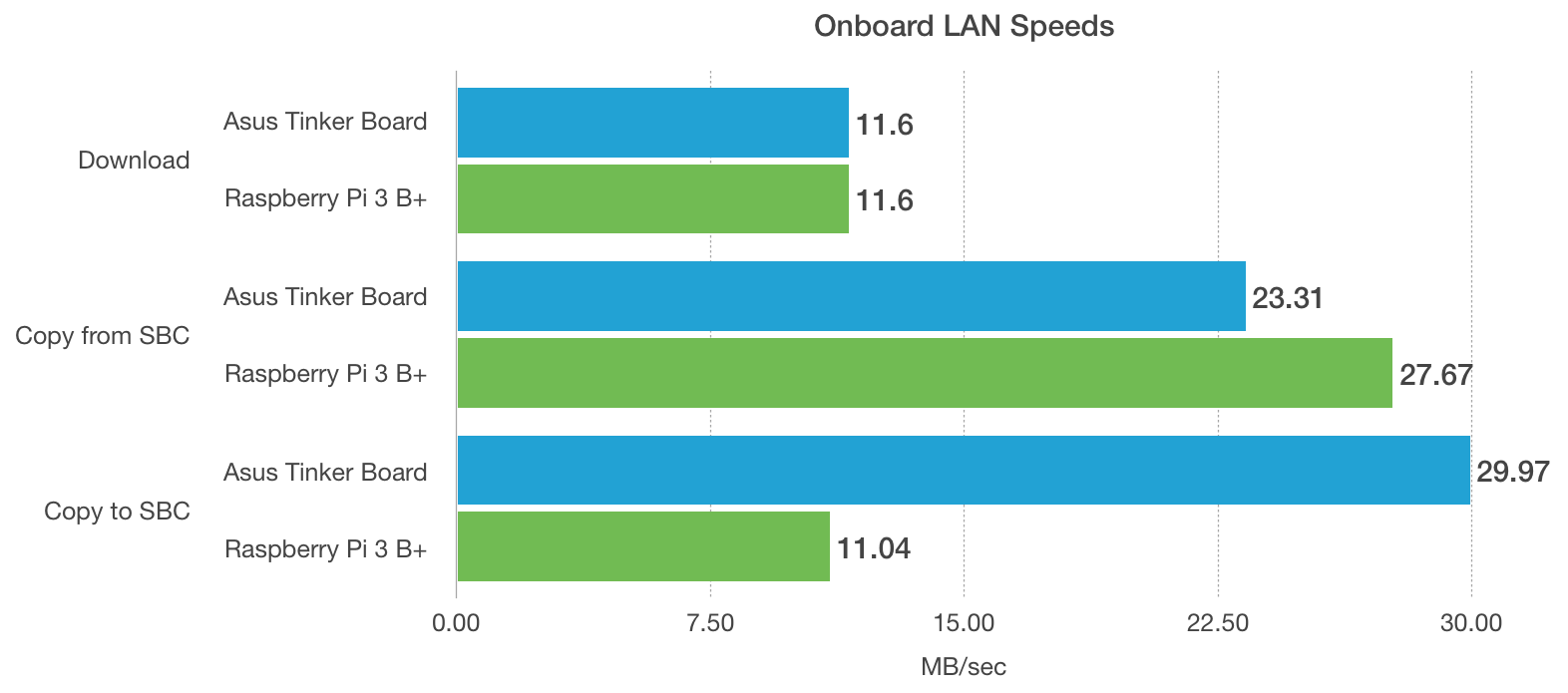
For file copies, which involve both networking and reading/writing on the microSD card, the Tinker Board does a respectable job. Especially for the writes, where the Tinker Board's much improved microSD controller bandwidth shines, allowing speeds up to 3x faster than the Raspberry Pi.
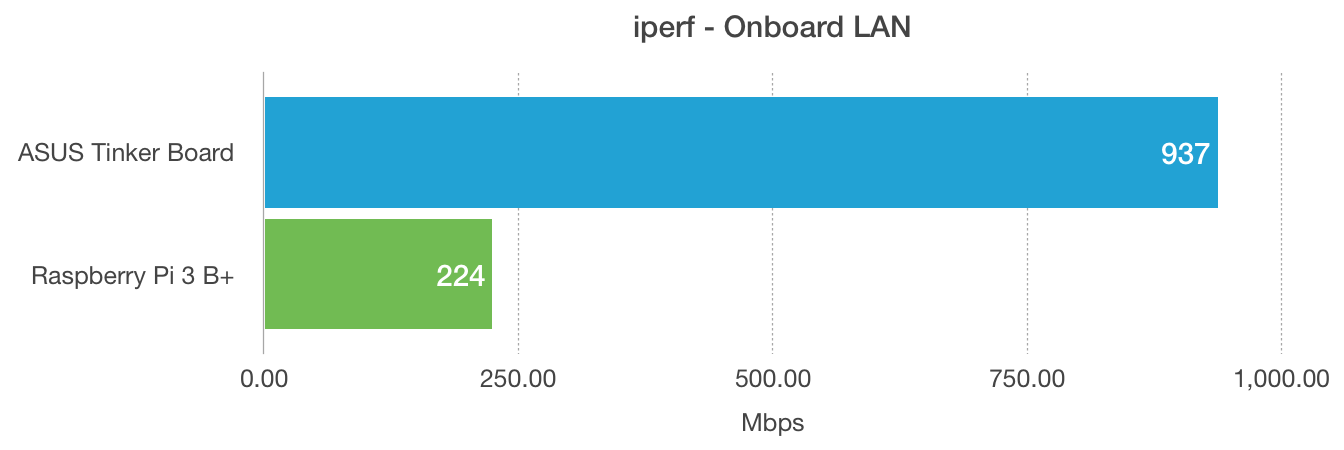
In terms of raw network performance, as measured by iperf, there's no competition. The ASUS Tinker Board's dedicated gigabit LAN bandwidth allows it to saturate a gigabit Ethernet connection, and it's not shared with the USB bus, nor with the microSD bus, meaning all other operations can operate at full speed as well.
For WiFi, it's a little bit of a different story. One of the Pi 3 B+'s headline features is a completely redesigned wireless package, from a new EMI shield, to a new antenna and 802.11ac 5 GHz networking support. The Pi 3 B+, then, has a major edge over the Tinker Board when it comes to potential performance with built-in WiFi. Let's see what that means in real-world usage:
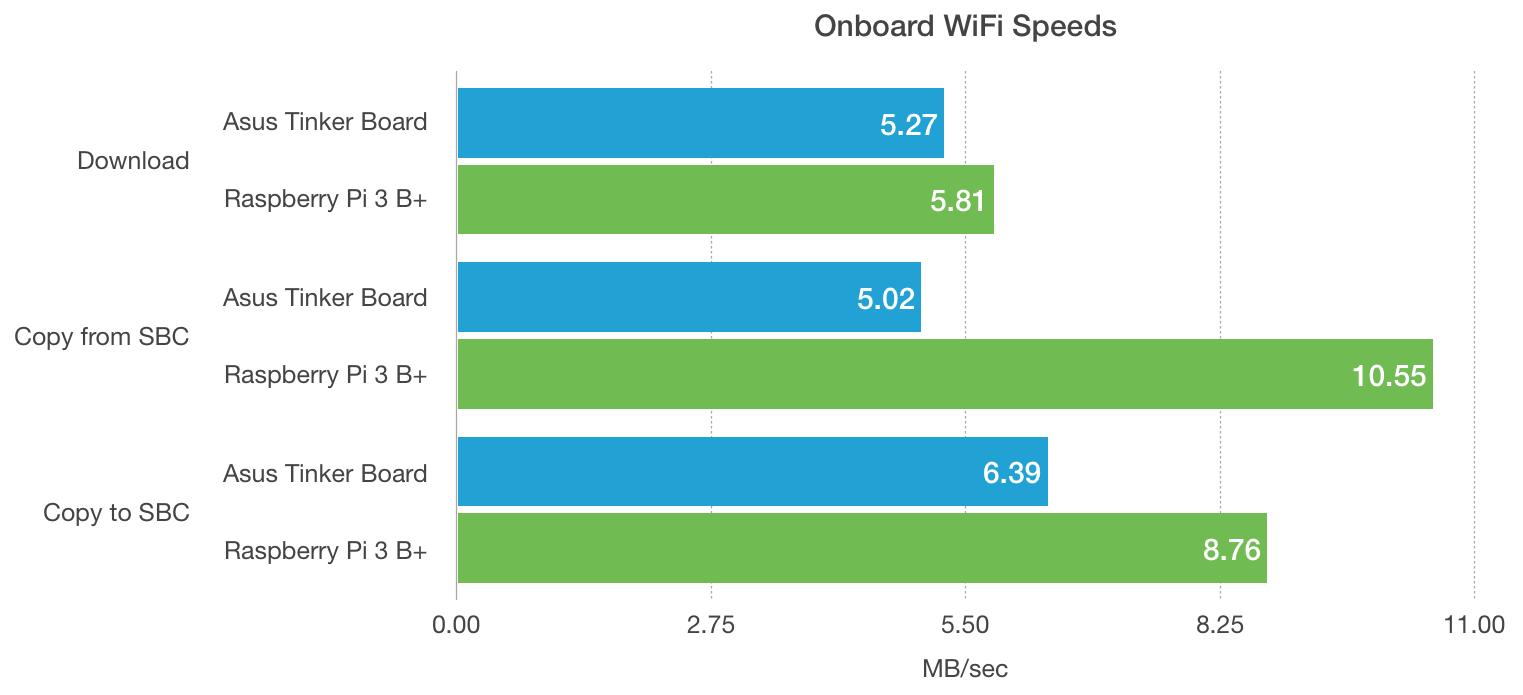
For things like file copies over WiFi, the performance difference isn't always huge, but the better bandwidth and signal on the Pi 3 B+ does mean you can get more reliable and speedy transfers.
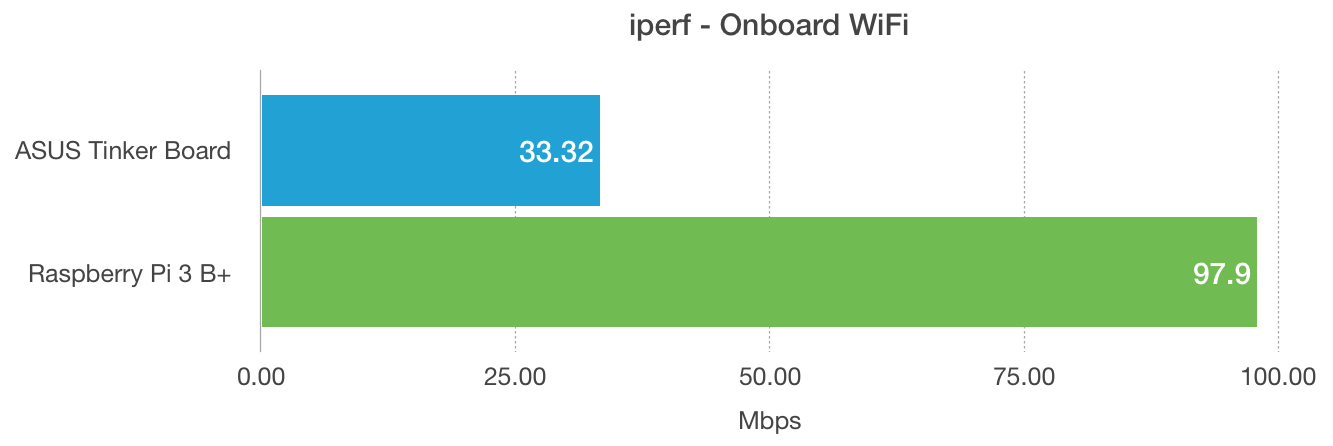
The raw performance measured with iperf (taking out the Internet connection and file system entirely) shows that the higher-specced Pi 3 B+ can outperform the 802.11n 2.4 GHz-only Tinker Board, getting about double the performance when all other variables are the same. But in either case, if you're using WiFi, you won't be able to achieve near the low latency, reliability, and bandwidth that you would using the wired LAN port, and performance will vary quite a bit (especially depending on signal quality).
For more benchmark details, see Networking Benchmarks on the Raspberry Pi Dramble website.
microSD
One performance metric that trips people up the first time they use an SBC is the slow performance of the main drive—the microSD card that runs the OS and impacts the performance of almost everything else on the system. MicroSD cards are not known for great performance in general computing tasks (which involve lots of small file reads and writes); they are usually optimized for reading or writing very large amounts of data as fast as possible, as they're most optimized for media recording devices and multiple-GB files. But the Raspberry Pi cripples the microSD performance even further, as you usually can't even sustain a large file read or write at more than 20 MB/second. Some of the microSD cards I've tested can hit 60 or more MB/second when I'm using them in my Mac with a USB 3.0 UHS-II SD card reader! So how does the ASUS Tinker Board compare?
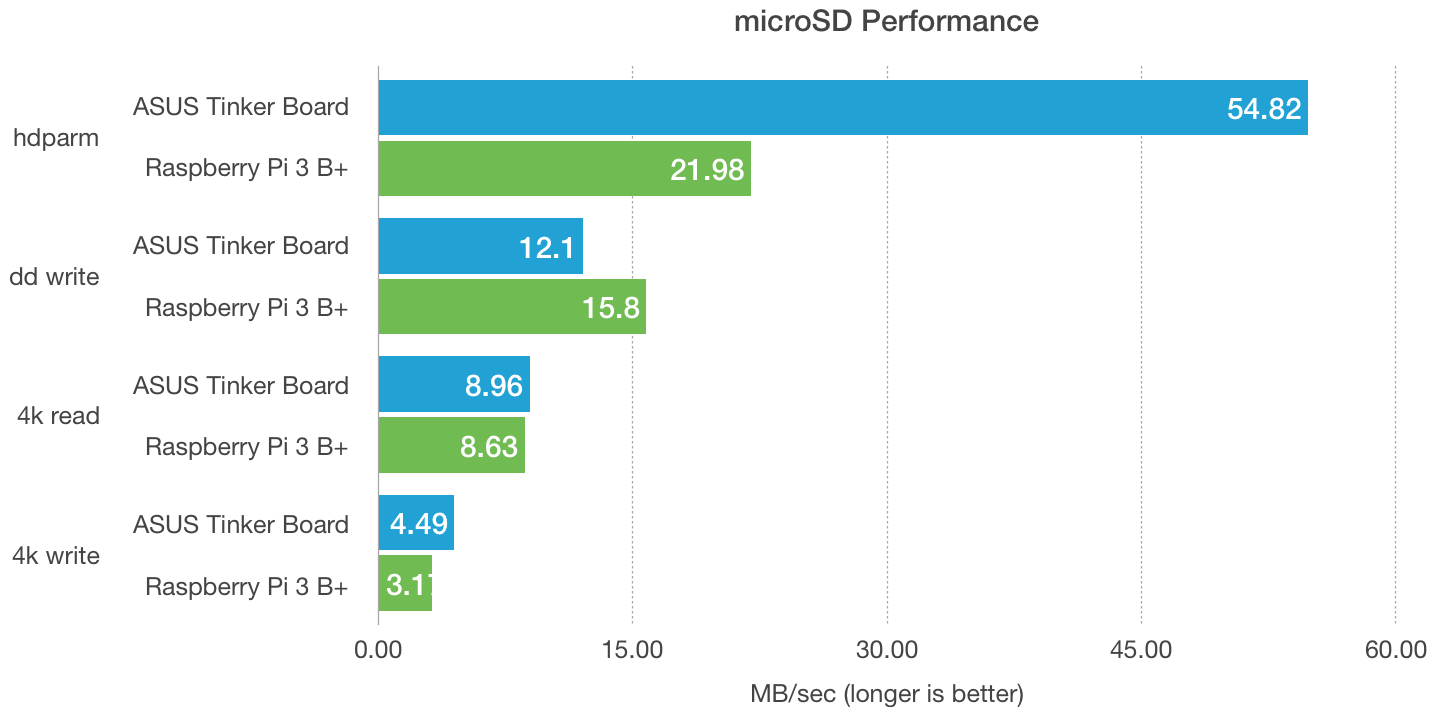
The microSD controller in the Tinker Board is clearly operating at a much higher data rate than the one in the Pi; even with the SD overclock enabled on the Pi, it gets nowhere near the performance of the Tinker Board. The hdparm raw read throughput looks impressive, but isn't really a practical aid in measuring how the two devices would feel in real world scenarios. However, the 4k read and write benchmarks track much more realistic scenarios (e.g. when you're booting the SBC, or opening an app, compiling something, browsing the web, etc.), and even here, the ASUS Tinker Board is up to 35% faster than the Pi 3 B+!
The microSD card I tested with is the fastest one I have benchmarked for SBC use (and I have benchmarked them all!), Samsung's Evo+ 32GB microSD card. Highly recommended!
For more benchmark details, see microSD Card Benchmarks on the Raspberry Pi Dramble website.
Power Consumption
One thing most SBCs do very well is conserve power; the mobile System-on-a-Chip (SoC) on which these computers are based is usually optimized for conserving power, especially when not doing intensive operations, because they're designed to operate primarily on battery power. Comparing the power consumption across different activities on the Pi and Tinker Board:
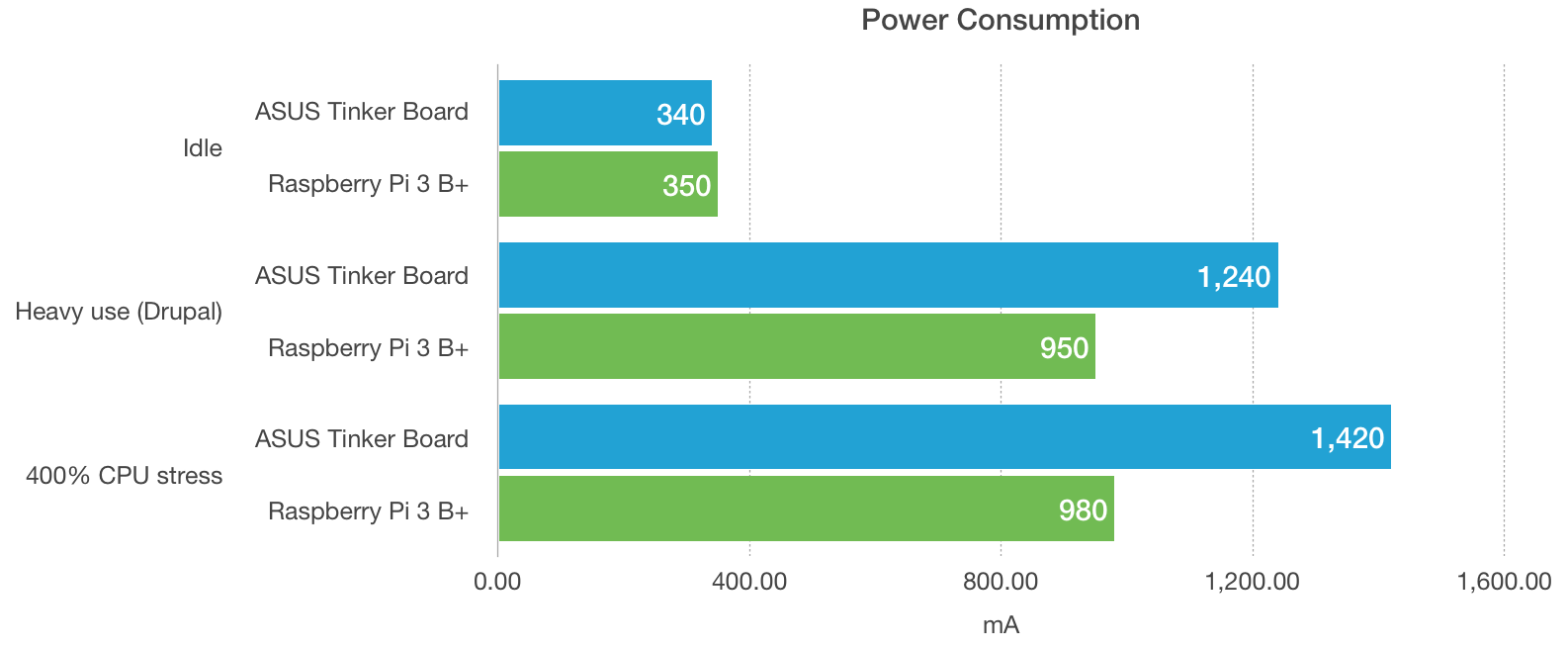
The idle power consumption is neck-and-neck, and bodes well for the Tinker Board; as we'll see later, the higher CPU frequency and CPU performance gains more than justify the increased power consumption under load, but it's very good to see the idle power consumption matches (within a margin of error) the Pi 3 B+. This means the Tinker Board does a good job of sipping power normally, but can quickly ramp up to tackle a CPU-intensive task, with slightly better power-efficiency (all things considered) than the Pi.
For more benchmark details, see Power Consumption Benchmarks on the Raspberry Pi Dramble website.
The importance of a good power supply
Just as with Raspberry Pis, the Tinker Board needs a good, high-output power supply to be able to run at full capacity and consistently. Especially when under heavy load, the Tinker Board can pull more than 2A peak power, and your best bet is to get a good, dedicated power supply like the NorthPada Tinker Board 5V 3A power supply.
CPU and Memory Performance
Let's see how the Pi and Tinker Board stack up when it comes to raw CPU and memory read/write performance, as measured by sysbench:
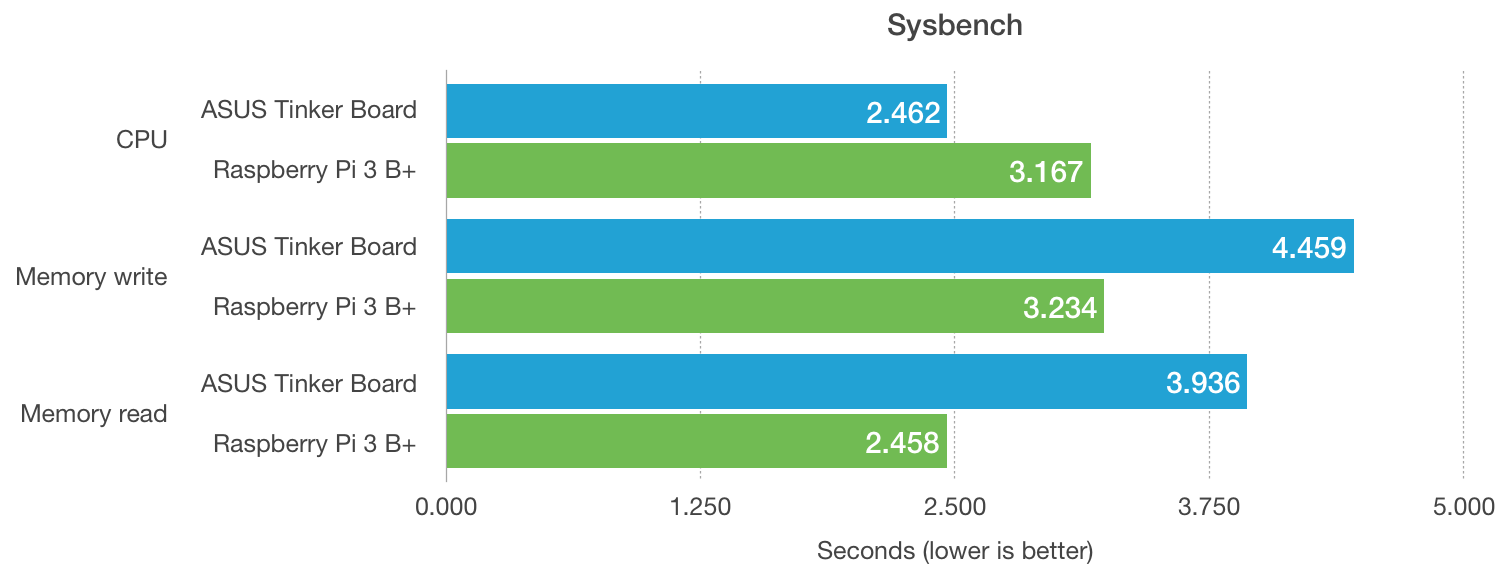
Even with the latest Pi 3 B+ CPU frequency increase, and the better thermal control from the new CPU package, the older Tinker Board's CPU soundly beats the Pi's by 25%. However, the memory performance is almost an inverse, as the Pi beats the Tinker Board by about 30% for both read and write operations.
In real-world usage, these numbers are much closer, but as we'll see in a minute, there are use cases where the overall system performance gives a thorough recommendation to the Tinker Board.
Drupal Performance
The most important benchmarks are real-world use cases. For something like logging temperature data, even the lowliest Pi Zero or Pi model A could handle it with aplomb. But for more advanced use cases, like using an SBC like the Tinker Board as a general purpose Debian workstation, or serving a website, the overall system performance has a huge impact on whether the computer feels fast or not. I do a lot of work with the Drupal open source Content Management System, so one of my best benchmarks is to install and run the latest version of Drupal, and run two tests: anonymous (cached) page loads, which test networking and memory access mostly; and authenticated (uncached) page loads, which tests CPU, database, and disk access:
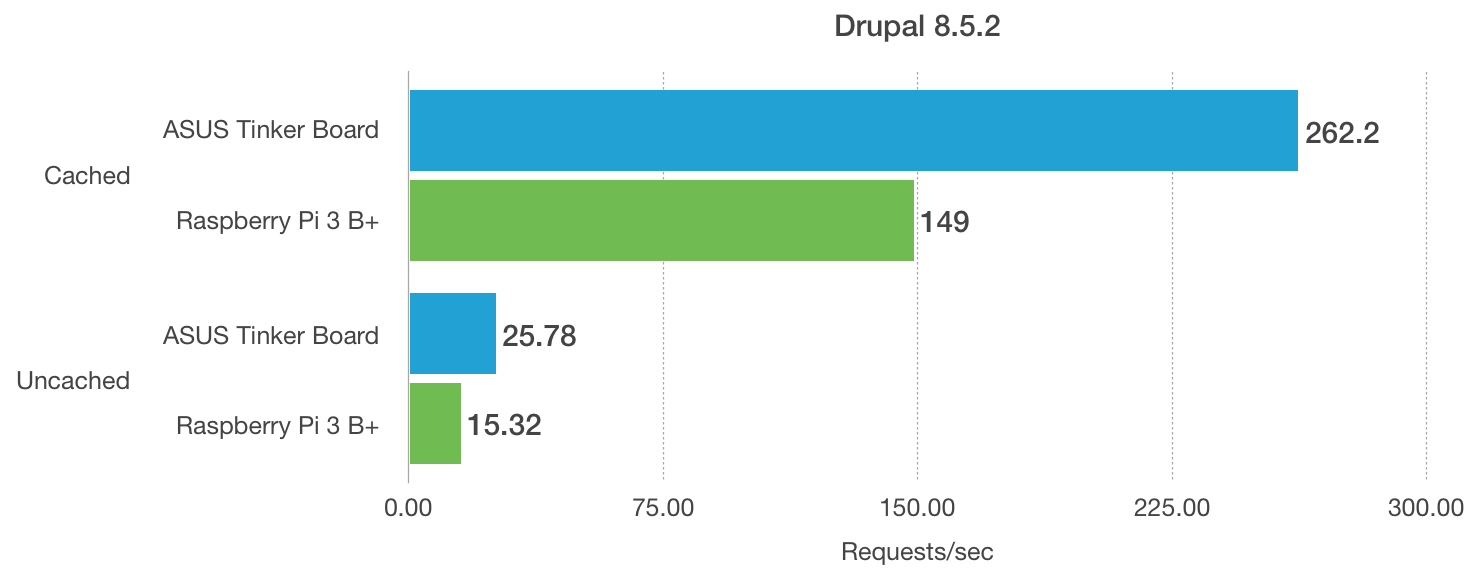
The anonymous benchmark ran 55% faster on the Tinker Board, and uncached page loads were 50% faster. It's interesting, because individually, the microSD, CPU, and memory benchmarks don't show more than a 20-30% performance improvement over the Pi 3 B+. But if you put everything together in this real-world benchmark, there's a huge performance delta, completely in the Tinker Board's favor.
Overall, it feels to me like the A17 SoC on the ASUS Tinker Board is tuned a little better for peak performance than the Pi's A53 SoC, and even though there's a little higher peak energy consumption, the performance boost more than justifies it.
Because of a few slight differences in the default OS layout with TinkerOS vs Raspbian, I had to modify the way I installed Drupal and the LEMP stack using Drupal Pi to make sure all the installation steps worked on the Tinker Board. After working through a few missing packages, everything seemed to run well.
For more benchmark details, see Drupal Benchmarks on the Raspberry Pi Dramble website.
Summary
So in the end, I think the question most people would ask themselves is: is the ASUS Tinker Board worth $15 more than a Raspberry Pi model 3 B or model 3 B+? I'd say yes, if you answer the following:
- You need the best performance out of an SBC
- You need more than 1 GB of RAM
- You want the slightly nicer setup experience, support, and fit-and-finish of the Tinker Board vs. other Pi clones (like Orange Pi, ODROID, etc.)
- You need fast networking
But if you didn't answer yes to one or more of those statements, I'd have a harder time recommending it.
The Pi community is pretty diverse and has you covered for so many projects and use cases, whereas there's fewer developers and bloggers posting about experiences with the Tinker Board. So the community still has room for improvement, but it's a little nicer, in my limited experience, than that of the other SBCs I've used.
The Pi is fast enough for most use cases, and especially with the modest speed bumps in the model 3 B+ that put it almost on par with the Tinker Board in some uses, it makes it hard to justify the increased price of the Tinker Board.
Even if the Tinker Board isn't right for you, it's worth watching ASUS and their next moves in this space. I like the design of the Tinker Board's colorful GPIO 100x more than the Pi, and their guides, forums, downloads, and support are pretty decent—as long as they keep them up to date. I'm really interested to see if ASUS will release a newer model in the next year that might go beyond where even the current Tinker Board is, performance-wise, as that would more than justify purchasing another one or two for me!
What about the Tinker Board S?
This year, ASUS released a slightly improved version of the Tinker Board, the Tinker Board S. It includes 16 GB of onboard eMMC memory—much faster for general computing than a microSD card—for an extra $20 or so. There are a few other small differences, but the eMMC addition is the biggest improvement. For my use cases, the eMMC doesn't make a big enough difference to justify the cost, so I'm more interested in products in the $50 range and lower. Once an SBC approaches $100 or so, there are other options (like a used Intel core i5 desktop) which offer 10-100x the performance and infinite expansion options.
But that's just me—I am okay with a larger footprint desktop computer for use cases which require more desktop-like disk, CPU, and memory performance. If you need that kind of performance in an SBC form factor, the S might be a good option too. The Tinker Board S should be available for sale in spring or summer 2018.
Comments