I returned my 2016 MacBook Pro with Touch Bar
tl;dr: After two weeks of use, I returned my 2016 13" MacBook Pro with Touch Bar and bought one with Function Keys instead. Read on for detailed Battery stress tests, performance tests, and an exploration of how Apple's botched this year's Pro lineup.
I've owned almost every generation of Mac desktop and laptop computers, and have survived many transitions: 680x0 to PowerPC, Classic Mac OS to OS X, to the PowerPC to Intel switch. I've also owned almost every generation of iPhone and iPad. I even maintain a huge list of all the Macs I've owned! I could justifiably be labeled an 'Apple fanatic'.
I use a Mac as my daily driver, and have rarely made a tech-related purchase I regretted. And I've never returned a Mac, until today.
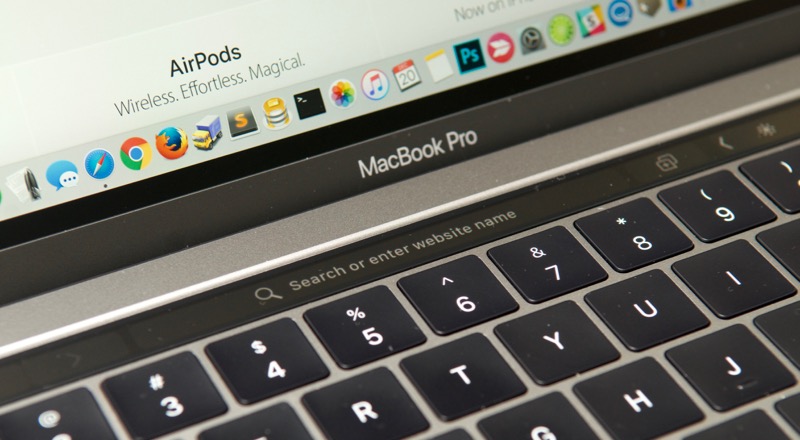
A close-up of the Touch Bar, one of Apple's most controversial innovations.
Late last year, Apple introduced the controversial '2016 MacBook Pro with Touch Bar', and there was quite a backlash from the developer community. Apple critics were quick to jump on the bandwagon and trash the laptop, but as an 'Apple fanatic', I was willing to give the Touch Bar a fighting chance.
After all, I thought, surely an engineer or manager would've put an end to the Touch Bar if there wasn't some redeeming value, right?
Reasons for upgrading
I have been using an 11" MacBook Air as my primary computer since 2011 (I've owned three separate 11" models—I love this netbook-like form factor!). After seeing the beautiful retina displays on MacBook Pros, I was biding my time for a new MacBook Air model that would include retina. Unfortunately, that never panned out, as Apple introduced the 12" MacBook, which is a nice computer in its own right, but not nearly as utilitarian as an Air, with its two USB ports, a Thunderbolt port, and a Magsafe connector. Really, the only two things I would've liked to have changed on my Air were a retina display and a nicer keyboard.

My old 2013 11" MacBook Air. It's been a faithful companion.
So every year I watched and waited, and the Air line got more stale. And in 2016, when the shoe dropped and the Air went on life support (along with the Pro and Mini, it seems), I decided to give the 2016 13" MacBook Pro with Touch Bar a try. Even if it cost ~$300 more than it should.
First impressions

There are a few aspects of the 2016 MBP that are great improvements over the 2015 and earlier models (I have a brand new 2015 13" MBP for work purposes too, so I'm comparing two brand new devices):
- Size matters: Some developers don't care about weight or size. I'm not one of them. I used an 11" Air for years, and am used to the ease of transport, the thinness, etc., and since I travel a bit, it's vastly superior to the older 2011 15" Pro I had decked out previously. The 2016 13" Pro is almost perfect—I really wish it still had the taper like my Air, because it's more comfortable to use as a laptop, but it's still better than the thicker, heavier 2015 model. I'm willing to pay a little bit in battery life and performance for a size reduction (to a point—more on that later).
- The keyboard is best in class: I love the crisper feel of the butterfly mechanism and larger keys on the 2016. I haven't done enough testing yet, but I feel I'm more accurate typing on the internal keyboard. Too bad it's sitting on my desk closed 80% of the time...
- Thunderbolt 3 / USB-C is the future: I'm no luddite; I welcome new standards and tech that will become ubiquitous. USB-C is the future, and I can't fathom why Apple hasn't switched the iPhone to USB-C yet... you can use the Google Pixel out of the box with Apple's current flagship laptop, but you can't use an iPhone without buying a separate cable or a dongle.
- Trackpad: Apple makes the best tracking device on the market, bar none. More is better. Some people argue palm rejection might be flaky, but I haven't had an issue yet. This is Apple's best trackpad ever, and when I use my wife's 2010 Air, I'm reminded just how much improved the tracking is on the 2016.
- SSD: Whoa, this thing is fast. It's fast enough that the SSD test utility I usually use, Blackmagic Disk Speed Test, maxed out at 2,000 MB/sec read and 1,888 MB/sec write speeds on the internal SSD. Using iozone, I benched more accurate random read speeds at 2083 MB/sec, and random write at a much lower 645 MB/s. Still blistering fast. I wish Apple made enterprise SSD controllers for my database servers—who needs RAM when disk I/O is so fast?!
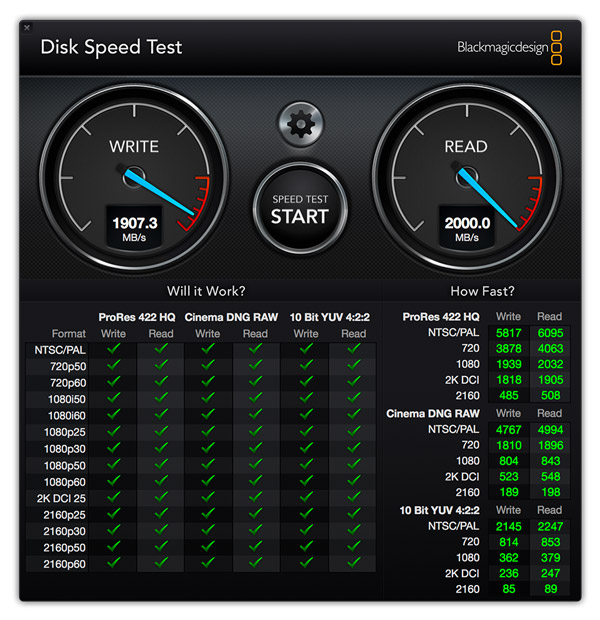
The SSD is really this fast. Even with random 4K reads.
But for every improvement, there is something disappointing:
- Touch Bar is useless: In fact, it's worse than useless. Even after two weeks' use, my pinkie could never find the escape key. And it's much too sensitive, as I would accidentally hit one of the other buttons when I was fat-fingering a + sign or hovering near the 'Delete' key. Read more about my distaste for the Touch Bar.
- 2 Thunderbolt ports on the Fn-key model is a slap in the face: Apple decided to only add two Thunderbolt/USB-C ports on the Function key model. After using both laptops for over a week, having at least a third port makes a lot of common scenarios easier (e.g. charge, plug in a USB hub, and plug in an external monitor). It's painful having just two ports, even though they're individually awesome, because I now have to use something like this AUKEY hub just so to plug in a 4K monitor and keyboard while powering my laptop at the same time.
- Battery Life: This deserves its own breakout section. See below.
- Soldered-in-everything: This irks me less than it used to, but it was (and is) amazing how people with 2009, 2010, 2011, etc. MacBook Pros can easily swap out hard drives for SSDs or upgrade their RAM and have a completely fresh and fast experience on a 5-6 year old Mac. At least the SSD should be upgradeable—and luckily, it is (maybe) in the function key model.
- Different chipsets: Apple went with a lower TDP chip in the function key Pro, along with a larger battery. But the chipset also means that there are slight speed differences in the two series of 2016 Pros. It's annoying to have to make tradeoffs between the two.
- Touch ID requires Touch Bar: I would've gladly paid a little extra for Touch ID in the function key Pro I'm currently using, since it makes login, auth and
sudothat much faster... but it's not an option. It works as well as the Touch ID on my iPhone 7, and I had no complaints with it whatsoever. It irks me Apple didn't put it in all the 2016 Pro lineup. - Price: This is the kicker—you have to pay more for the Touch Bar, even though it provides a worse computing experience. And you can't get Touch ID, two extra Thunderbolt ports, or a few other niche niceties without also taking the baggage that is Touch Bar along for the ride.
But enough with lists... let's deep dive into a couple of the primary reasons I chose to return my Touch Bar laptop and get a less expensive MacBook Pro with Function Keys.
Battery Life
The battery is the straw that broke this camel's back. I was limping along disliking the Touch Bar for a couple weeks, thinking I could live with it and get used to it, but after two times using the Touch Bar model on the road without power nearby, I nearly lost it when my laptop was under 10% battery remaining after only three hours of use.
I'm a developer who also dabbles in photo and video work. I hit my laptops hard. With my older 11" MacBook Air, I was used to 3-4 hour battery life during development sessions on an airplane or in other places where power outlets were impossible to find. I'm willing to sacrifice some power for a smaller footprint, and I'm used to it. But with the 13" Pro, which promised 10+ hours of productivity (which should translate to 4-5 hours of 'actual' productivity with my usage pattern), I was expecting to at least maintain the status quo, but get the speed boost a Pro model promises.
Apple quotes both the Touch Bar and Function Key models as having "up to 10 hours wireless web", but as iFixit's teardowns (Fn key | Fn key) show, the Function Key model has a 54.5 Wh battery, while the Touch Bar model only packs 49.2 Wh. The 2015 13" Pro crammed in a whopping 74.9 Wh battery!
Since I'm a developer, and one of my goals in life is to automate all boring work into oblivion (heck, I wrote a book on the topic!), I decided to automate a battery slugfest—a fairly realistic test of the most brutal conditions I would be subjecting my laptop to—and I came up with (and open sourced the code for) the MacBook Pro Battery Life Test. You can read more about the test and methodology in that GitHub repository (I used version 1.1.0 for the test results below), and came up with the following data points for comparison:
| # Builds completed | Total battery life | Avg. Build time | |
|---|---|---|---|
| 2016 Touch Bar - 3.1 GHz i5 | 24 | 3:30:00 | 0:08:45 |
| 2016 Fn key - 2.4 GHz i7 | 30 | 3:54:00 | 0:07:52 |
| 2015 Retina - 3.1 GHz i7 | 48 | 5:36:00 | 0:06:58 |
Raw data from the third test run on each laptop is available in this Google Sheet: 2016 MacBook Pro Battery Comparisons.
The results boggle the mind. Well, not really, when you realize the 2016 Touch Bar Pro has a smaller battery, a CPU chugging twice the wattage (under load), and a second display (the Touch Bar) to power (aside: my test didn't even power up the Touch Bar, so in normal usage (where the Touch Bar would keep lighting up every time you do anything), the battery life would be even worse)!
Here's a comparison of battery life measured in total test run time vs battery capacity. Percent differences are compared to the baseline of the 2015 model:
| Capacity | Capacity % difference | Total battery life | Life % difference | |
|---|---|---|---|---|
| 2016 Touch Bar - 3.1 GHz i5 | 49.2 | -34% | 3:30:00 | -36% |
| 2016 Fn key - 2.4 GHz i7 | 54.5 | -27% | 3:54:00 | -30% |
| 2015 Retina - 3.1 GHz i7 | 74.9 | baseline | 5:36:00 | baseline |
I'm willing to take the hit on battery life for the size. But I'm not willing to take that much of a hit compared to last year's model. After running these tests a few times and realizing it's not a fluke, I decided the Touch Bar model had to go. I immediately ordered a Function Key Pro, which isn't a huge improvement, but at least gives me another 30 minutes of runtime under heavy load.
CPU / General speed
Interestingly, from all my research online, it seemed the faster-clocked 3.1 GHz i5 CPU in the Touch Bar Pro should've bested the 2.4 GHz i7 I now have in my Function Key Pro... but it didn't, at least not for any of my real-world use cases (notice that the average time per build in the graph above is 11% faster on the Fn key). And it barely beats the Function Key in raw CPU benchmarks:
| Single core | Multi core | |
|---|---|---|
| TouchBar / 3.1 GHz i5 'Skylake' | 4059 | 7723 |
| Fn Key / 2.4 GHz i7 'Skylake' | 3809 | 7495 |
| 2015 / 3.1 GHz i7 'Broadwell' | 3860 | 7356 |
I am generally pleased with the performance of either of these Skylake CPUs. They're many times improved over the relatively ancient 1.7 GHz i7 I had in my 11" Air, and they're even faster (at lower clock speeds) than the higher-clocked 2015 Broadwell models. The snappier GPU this year is also nice, though nothing beats an independent GPU like the ones found in the 15" Pro lineup.
It irritates me, however, that the same options aren't available in both the Function Key and Touch Bar Pro models. Not only does it feel insulting to not be able to get the fastest CPU just because I don't want an annoying second screen on my keyboard, but it also makes comparing pricing between the models difficult.
I spent over an hour reconfiguring models and searching all over the Internet to find spec sheets for the different CPUs used in the models before I came to the conclusion (which I found later to be somewhat incorrect) that the 3.1 GHz i5 would be adequate for my needs. This is not the customer experience I normally have when purchasing Apple products. It feels more like the era that produced the Performa 637CD or 6360, Power Macintosh 6200, etc... all those models that had such slight differences and were a far cry from the 'Good', 'Better', 'Best' configurations Steve Jobs espoused.
Fit and Finish

The 2016 MacBook Pro continues to lead in trackpad feel and performance.
The build quality is the single largest factor in my decision to stick it out on Apple's platform for the foreseeable future. I've tried out both the Lenovo and Dell thin developer-oriented laptops, and there were always little issues that irritated me, like strange scrolling behavior, a creaky case, and varying levels of support for Linux that require me to put on my developer hat to work through problems (I want my workstation OS and hardware to just work, thank you very much!).
I also have a Lenovo T420 sitting on my desk that I use for work in Windows 10, Fedora 25, and Ubuntu 16.04, and if I didn't care about portability, I'd likely be fine with a tank of a laptop like the T4xx line. But it's not for me as a daily driver—rather, on the MacBook Pro, you have the trackpad, the screen (the wide-color-gamut retina display is a great display), the keyboard, the backlighting... put it all together, and this is still (in my opinion) the best laptop hardware put together by any manufacturer.
The question in my mind is: if Apple decides the Touch Bar is the wave of the future, where does that leave me? I'm vowing right now to not buy another laptop with Touch Bar (at least not in its current form).
I hope, for Apple's sake, they can nip this in the bud and figure out where the Mac lineup is going before too many developers switch back to other hardware. Otherwise some of the amazing software that does keep me somewhat locked in, like RadarScope Pro, Transmit, Sequel Pro, nvAlt, TweetBot, and the Adobe CC apps will likely falter, and that would be the tipping point for me.
Aside: I spend 95% of my day working in a Terminal or in a browser building giant enterprise websites and other software. I'm mostly platform-agnostic (heck, I do most of my work inside VMs anyways), but the GUI apps I use for the other 5% of the day are highly optimized and will likely never be available on Linux. Therefore, I can't envision a future working in a Linux environment for my day-to-day workstation (at least, as long as macOS maintains its mostly-POSIX-compatible nature).
Odds and ends
There are a few other things I've learned after a few weeks' use of both models of laptop, which you might want to consider if you're buying a new Pro:
- No more Magsafe: One minor disappointment (but a necessary one) is the removal of a Magsafe charging port in favor of charging via USB-C/Thunderbolt. In some ways, this is more convenient—more manufacturers make hubs with pass-through charging, and you can charge a MacBook Pro even with a weaker generic 30W USB-C charger—but there has never been a port as much a joy to use as Magsafe.
- Speakers: The speakers are a mixed bag. And yet another thing different between the models. On the Touch Bar Pro, the speakers deflect more sound down, so on solid surfaces, they sound full and loud. On a lap, not quite as much, but they're still pretty good. On the Function Key Pro, the speakers project up through the grill, so they provide more consistent sound, but lack some of the depth I heard from the Touch Bar model.
- Touch Bar is annoying: I just have to put in another jab. I hate this thing. I remember many occasions where I would be typing and something weird would happen because my finger hovered near (but barely touched) a softkey on the Touch Bar. Also, the annoyance of seeing new things constantly happening inside the Touch Bar, but always delayed by ~200ms from when I did the action that caused the new display to appear. I just can't believe Apple decided to ship the thing in a 'Pro' laptop. Maybe it would work better as a neat gimmick in the 12" MacBook.
Conclusion
The 2016 MacBook Pro is a mixed bag. Many features (most shared between the two models) are huge improvements in the Pro lineup—like the SSD speed, size and weight, keyboard feel, and Thunderbolt 3/USB-C. Other features (like the Touch Bar) are worse than useless—they make the user experience worse.
I hope Apple realizes the blunder with the Touch Bar (and with the confusing lineup of laptops they currently sell) and either fix it or remove it entirely. I'd be happy if Apple only preserved the Touch ID/power key combo.
Comments