How to build your own Raspberry Pi Cluster
This post is more than 10 years old. I do not delete posts, because even old information is still useful, but please know that some material on this page may be outdated or incorrect. Thanks!
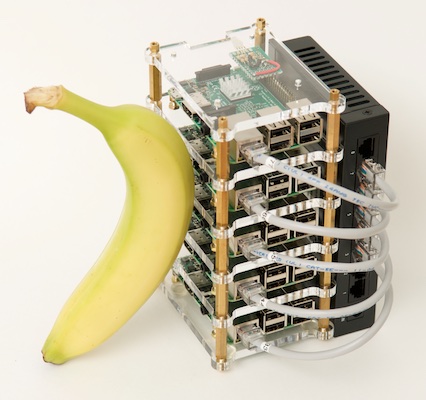
The banana is for scale.
When I originally built the Raspberry Pi Dramble 6-node Pi cluster in 2014 (for testing Ansible with bare metal hardware on the cheap), I compiled all the code, notes, etc. into a GitHub repository. In 2015, I decided to take it a step further, and I started hosting www.pidramble.com on the cluster, in my basement office!
Every time I've shared the cluster with others during presentations or at events like DrupalCon, someone asks how it's built. While I do have almost all my notes and instructions for building the entire cluster on the Pi Dramble Wiki, a step-by-step visual guide is better. Therefore, I'm posting a series of videos, "Let's Build a Raspberry Pi Cluster", to my YouTube channel.
The first video goes over hardware parts and setup:
The second goes over microSD card setup and Raspbian OS configuration:
These videos also serve as background material for those attending my upcoming talks on Drupal 8 and the Raspberry Pi:
- Raspberry Pi with a Side of Drupal 8 Acquia Booth, Wednesday afternoon, 3:15 p.m.
- Highly-available Drupal on a Raspberry Pi Cluster php[tek], May 25, 3:30 p.m.
I'll post again once I've wrapped up the video series (it will likely be either 5 or 6 parts total). What do you think of the videos? Should I consider making more of this kind of video, or ditch the idea and stick to writing?
Comments