Introducing the Dramble - Raspberry Pi 2 cluster running Drupal 8
This post is more than 10 years old. I do not delete posts, because even old information is still useful, but please know that some material on this page may be outdated or incorrect. Thanks!
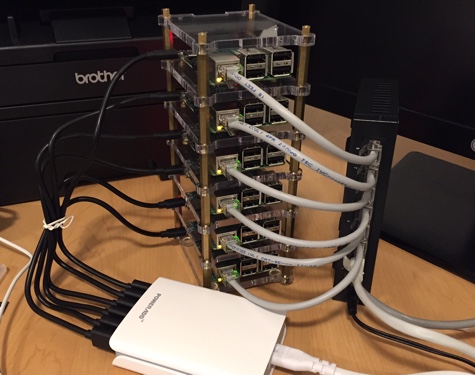
I've been tinkering with computers since I was a kid, but in the past ten or so years, mainstream computing has become more and more locked down, enclosed, lightweight, and, well, polished. I even wrote a blog post about how, nowadays, most computers are amazing. Long gone are the days when I had to worry about line voltage, IRQ settings, diagnosing bad capacitors, and replacing 40-pin cables that went bad!
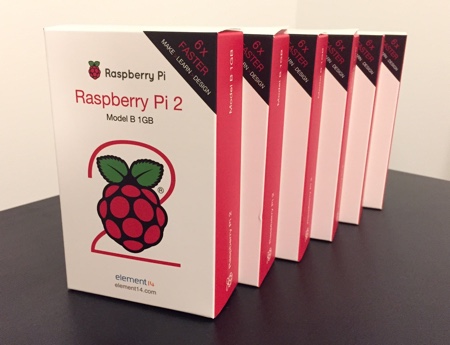
But I'm always tempted back into my earlier years of more hardware-oriented hacking when I pull out one of my Raspberry Pi B+/A+ or Arduino Unos. These devices are as raw of modern computers as you can get—requiring you to actual touch the silicone chips and pins to be able to even use the devices. I've been building a temperature monitoring network that's based around a Node.js/Express app using Pis and Arduinos placed around my house. I've also been working a lot lately on a project that incorporates three of my current favorite technologies: The Raspberry Pi 2 model B (just announced earlier this month), Ansible, and Drupal!
In short, I'm building a cluster of Raspberry Pis, and designating it a 'Dramble'—a 'bramble' of Raspberry Pis running Drupal 8.
Motivation
I've been giving a number of presentations on managing infrastructure with Ansible in the past couple years. And in the course of writing Ansible for DevOps (available on LeanPub!), I've done a lot of testing on VMs both locally and in the cloud.
But doing this testing on a 'local datacenter'—especially one that fits in the palm of my hand—is great for two reasons:
- All networking is local; conferences don't always have the most stable networking, so I can do all my infrastructure testing on my own 'local cloud'.
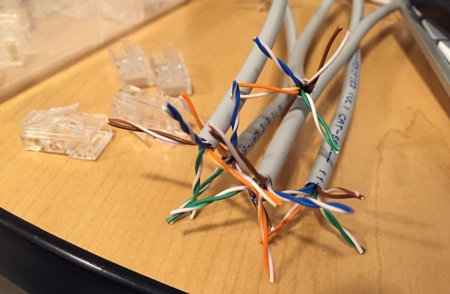
- It's pretty awesome to be able to hold a cluster of physical servers and a Gigabit network in my hand!
Lessons Learned (so far!)
Building out the Pi-based infrastructure has taught me a lot about small-scale computing, efficient use of resources, benchmarking, and also how Drupal 8 differs (spoiler: it's way better) from Drupal 7 in terms of multi-server deployment and high-availability/high-performance configurations.
I've also learned:
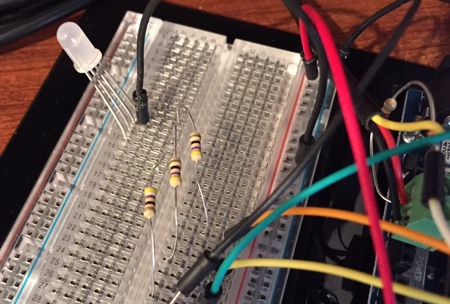
- How to control RGB LEDs with the Pi and make an LED 'breathe' Drupal blue :)
- The importance of a clean power supply and decent wiring and accessories for a stable Pi cluster.
- Ways to measure power consumption and conserve energy when using Raspberry Pis—or any servers that consume energy.
- The incredible variety of quality/performance in cheap microSD and SD cards.
- How to use Redis (instead of Memcached) for caching in Drupal 8.
- The performance of MySQL in a slow I/O, high latency environment—via USB or internal storage.
- How to deploy either GlusterFS or NFS for shared Drupal files folders and test both.
- ...and much more!
Benchmarking
I've been benchmarking the heck out of this infrastructure, and besides finding that the major limiting factor with a bunch of low-cost computers is almost always slow I/O, I've found that:
- On-the-fly gzip actually harms performance (in general) when your CPU isn't that fast.
- Redis caching gives an immediate 15% speedup for Drupal 8.
- Different microSD cards deliver order-of-magnitude speedups. As an example, one card took 20 minutes to import a 6MB database; another card? 9 seconds.
- Drupal 8 is kinda slow (but I don't need to tell you that).
- Still to come: Nginx vs. Apache with php-fpm, Nginx vs. Varnish for load balancing, Redis vs. Memcached for caching. MySQL vs. MariaDB for database. And more!
Since I have this nice little cluster of Raspberry Pis humming along using half the power of a standard light bulb, the sky is the limit! And the fact that the servers are slower and have different performance considerations than typical modern cloud-based infrastructure actually helps to expose certain performance-related flaws that I wouldn't have otherwise!
Finally, it helps me stay creative in finding ways to eke out another 50 KB/sec of bandwidth here, or 100 iops there :)
See the Dramble in person!
So why am I mentioning all this? Because I want to bring the Dramble with me to some Drupal events, and I'd love to share it with you, explain everything in more detail, and most importantly: demonstrate modern and easy Drupal 8 deployment with Ansible on it.
I'll be bringing it to #MidCamp in Chicago on Saturday, March 21, and I've also submitted a session for DrupalCon LA: Deploying Drupal 8 to Bare Metal with Ansible - Live!
I hope the session is selected and I can bring the Dramble with me to LA in a couple months :)
Also, if you haven't submitted your own session for DrupalCon LA, the deadline is Friday; go submit it now!
For more on the Dramble itself, check out the Raspberry Pi Dramble project on GitHub, and see what I'm working on over in the Dramble issue queue.
Comments