NFS, rsync, and shared folder performance in Vagrant VMs
This post is more than 10 years old. I do not delete posts, because even old information is still useful, but please know that some material on this page may be outdated or incorrect. Thanks!
It's been a well-known fact that using native VirtualBox or VMWare shared folders is a terrible idea if you're developing a Drupal site (or some other site that uses thousands of files in hundreds of folders). The most common recommendation is to switch to NFS for shared folders.
NFS shared folders are a decent solution, and using NFS does indeed speed up performance quite a bit (usually on the order of 20-50x for a file-heavy framework like Drupal!). However, it has it's downsides: it requires extra effort to get running on Windows, requires NFS support inside the VM (not all Vagrant base boxes provide support by default), and is not actually all that fast—in comparison to native filesystem performance.
I was developing a relatively large Drupal site lately, with over 200 modules enabled, meaning there were literally thousands of files and hundreds of directories that Drupal would end up scanning/including on every page request. For some reason, even simple pages like admin forms would take 2+ seconds to load, and digging into the situation with XHProf, I found a likely culprit:
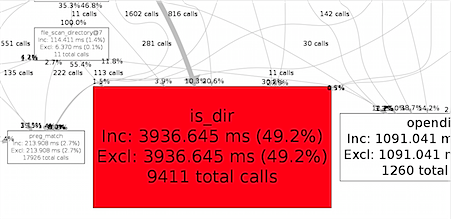
There are a few ways to make this less painful when using NFS (since NFS incurs a slight overhead for every directory/file scan):
- Use APC and set stat=0 to prevent file lookups (this is a non-starter, since that would mean every time I save a file in development, I would need to restart Apache or manually flush the PHP APC cache).
- Increase PHP's
realpath_cache_sizeini variable, which defaults to '16K' (this has a small, but noticeable impact on performance). - Micro-optimize the NFS mounts by basically setting them up on your own outside of Vagrant's shared folder configuration (another non-starter... and the performance gains would be almost negligible).
I wanted to benchmark NFS against rsync shared folders (which I've discussed elsewhere), to see how much of a difference using VirtualBox's native filesystem can make.
For testing, I used a Drupal site with about 200 modules, and used XHProf to measure the combined Excl. Wall Time for calls to is_dir, readdir, opendir, and file_scan_directory. Here are my results after 8 test runs on each:
NFS shared folder:
- 1.5s* (realpath_cache_size = 16K - PHP default)
- 1.0s (realpath_cache_size = 1024K)
- Average page load time: 1710ms (realpath_cache_size = 1024K, used admin/config/development/devel)
*Note: I had a two outliers on this test, where the time would go to as much as 6s, so I discarded those two results. But realize that, even though this NFS share is on a local/internal network, the fact that every file access goes through the full TCP stack of the guest VM, networking issues can make NFS performance unstable.
Native filesystem (using rsync shared folder):
- 0.15s (realpath_cache_size = 16K - PHP default)
- 0.1s (realpath_cache_size = 1024K)
- Average page load time: 900ms (realpath_cache_size = 1024K, used admin/config/development/devel)
Tuning PHPs realpath_cache_size makes a meaningful difference (though not too great), since the default 16K cache doesn't handle a large Drupal site very well.
As you can see, there's really no contest—just as NFS is an order of magnitude faster than standard VirtualBox shared folders, native filesystem performance is an order of magnitude faster than NFS. Overall site page load times for the Drupal site I was testing went from 5-10s to 1-3s by switching from NFS to rsync!
I've updated my Drupal Development VM and Acquia Cloud VM to use rsync shares by default (though you can still configure NFS or any other supported share type), and to use a realpath_cache_size of 1024K). Hopefully Drupal developers everywhere will save a few minutes a day from these changes :)
Note that other causes for abysmal filesystem performance and many calls to is_dir, opendir, etc. may include things like a missing module or major networking issues. Generally, when fixing performance issues, it's best to eliminate the obvious, and only start digging deeper (like this post) when you don't find an obvious problem.
Notes on using rsync shared folders
Besides the comprehensive rsync shared folder documentation in Vagrant's official docs, here are a few tips to help you get up and running with rsync shared folders:
- Use
rsync__argsto pass CLI options torsync. The defaults are["--verbose", "--archive", "--delete", "-z"], but if you want to preserve the files created within the shared folder on the guest, you can set this option, but without--delete. - Use
rsync__excludeto exclude directories like.gitand other non-essential directories that are unneccessary for running your application within the VM. While not incredibly impactful, it could shave a couple seconds off the rsync process.
Not all is perfect; there are a few weaknesses in the rsync model as it is currently implemented out-of-the-box:
- You have to either manually run
vagrant rsyncwhen you make a change (or have your IDE/editor run the command every time you save a file), or havevagrant rsync-autorunning in the background while you work. - rsync is currently one-way only (though there's an issue to add two-way sync support).
- Permissions can still be an issue, since permissions inside the VM sometimes require some trickery; read up on the
rsync__chownoption in the docs, and consider passing additional options to thersync__argsto manually configure permissions as you'd like.
Comments