Stop letting .DS_Store slow you down
This post is more than 10 years old. I do not delete posts, because even old information is still useful, but please know that some material on this page may be outdated or incorrect. Thanks!
I have over 100 git repositories on my Mac, and for almost every one, I sometimes browse the directory structure in the Finder. Once I do that, I inevitably end up with a few pesky .DS_Store files that want to be added to my repo:
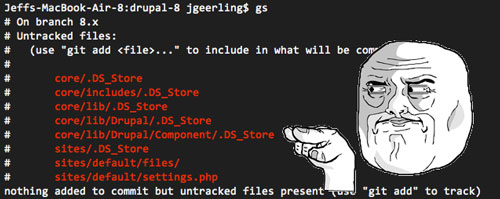
.DS_Store files don't add anything of value to my code (they just tell Mac OS X about folder display and icons), so I always end up adding them to my own projects' .gitignore files. But when I'm working on other repositories (like Drupal, or a fork from GitHub) I don't want to add a .gitignore if none exists, or mess with the project's existing .gitignore. So what's a coder to do?
There are a couple good solutions:
- Set git's core.excludesfile setting to a file of your choosing, with
*.DS_Storeinside:$ git config --global core.excludesfile ~/.gitignore $ echo *.DS_Store >> ~/.gitignore(Adapted from this SO answer.)
- You can avoid adding a .gitignore file on a per-repo basis by adding
*.DS_Storeto one repository's.git/info/excludefile (the .git folder is an invisible folder in the root of your git repo).
There! No more .DS_Store killing your commit momentum!
[Update: @applemachome told me about a for-pay app, BlueHarvest, that should help with this problem in a more general fashion (it can keep pesky .DS_Store files off of external and shared network volumes, too!). But it's probably overkill for most people.]
Comments