Real User Monitoring (RUM) with Pingdom and Drupal
This post is more than 10 years old. I do not delete posts, because even old information is still useful, but please know that some material on this page may be outdated or incorrect. Thanks!
Edit: There's a module for that™ now: Pingdom RUM. The information below is for historical context only. Use the module instead, since it makes this a heck of a lot simpler.
Pingdom just announced that their Real User Monitoring service is now available for all Pingdom accounts—including monitoring on one site for free accounts!
This is a great opportunity for you to start making page-specific measurements of page load performance on your Drupal site.
To get started, log into your Pingdom account (or create one, if you don't have one already), then click on the "RUM" tab. Add a site for Real User Monitoring, and then Pingdom will give you a <script> tag, which you then need to insert into the markup on your Drupal site's pages.
The easiest way to do this is to use drupal_add_html_head() within the page_alter hook (in your theme's template.php, or in a custom module):
<?php
/**
 * Implements hook_page_alter().
 */
function THEMENAME_page_alter($page) {
  // Add Pingdom RUM code.
  $pingdom_rum = array(
    '#type' => 'html_tag',
    '#tag' => 'script',
    '#attributes' => array(
      'type' => 'application/javascript',
    ),
    '#value' => '[SCRIPT TAG CONTENT HERE]',
  );
  drupal_add_html_head($pingdom_rum, 'pingdom_rum');
}
?>
Replace THEMENAME with your module or theme name, and [SCRIPT TAG CONTENT HERE] with the content of the pingdom script tag (excluding the two <script> tags at the beginning and end).
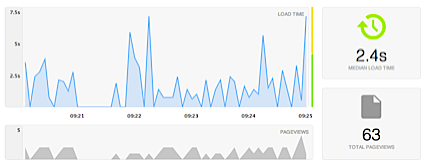
Once you've done this, go back to Pingdom, and you can view page load times in real-time:
Pretty nifty!
Note: If you're looking for a great website monitoring service that's a bit simpler and cheaper than something like Pingdom (which we love!), check out Server Check.in :)
Comments