Can't Disable Annoying Chrome Notifications menu bar item on Mac OS X
This post is more than 10 years old. I do not delete posts, because even old information is still useful, but please know that some material on this page may be outdated or incorrect. Thanks!
Update (7/20/14): You can finally disable the notifications icon by selecting "Hide Notifications Icon" from the Chrome menu:
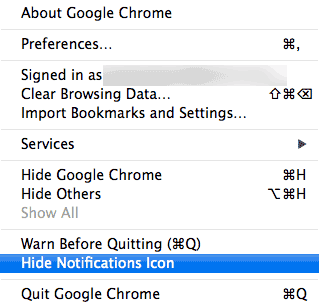
Original post below.
Today, I received a mysterious notification from one of my Chrome extensions that popped up under a generic alarm bell icon in my Mac OS X menu bar:
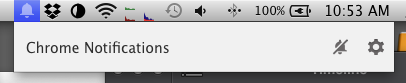
No thanks. I have Notification Center (built into Mac OS X), and if I wanted to see spammy notifications from Chrome extensions, I would enable them there. I know I can disable individual (or all) extensions from this Chrome Notification Center, but that doesn't make the icon go away. Nor does the standard trick of holding down the command key and dragging the icon off the menu bar.
No... Google seems to think that every Chrome user on a Mac wants this non-UI-conforming precious-menu-bar-real-estate-consuming icon sucking up resources and precious space, without any way of disabling it. And when users point out that Chrome should use the system's built in notifications system (like every other mainstream app nowadays), Google says no, we'll use our confusing menubar icon instead.
Unfortunately, going to about:flags doesn't allow disabling of the desktop notification center (since it's managed in the main Chrome settings area now), and explicitly excluding all plugins inside Chrome's settings > Show advanced settings... > Content settings... > Notifications doesn't do a thing either.
Switching back to FireFox or Safari is looking more appealing every day.
[Update: It looks like if you go to chrome://flags and set the 'rich desktop notifications' flag to Disabled, then restart Chrome, the icon goes away. I guess that's an okay temporary fix, but still...]
Comments