APC Caching to Dramatically Reduce MySQL traffic
This post is more than 10 years old. I do not delete posts, because even old information is still useful, but please know that some material on this page may be outdated or incorrect. Thanks!
One Drupal site I manage has seen MySQL data throughput numbers rising constantly for the past year or so, and the site's page generation times have become progressively slower. After profiling the code with XHProf and monitoring query times on a staging server using Devel's query log, I found that there were a few queries that were running on pretty much every page load, grabbing data from cache tables with 5-10 MB in certain rows.
The two main culprits were cache_views and cache_field. These two tables alone contained more than 16MB of data, which was queried on almost every page request. There's an issue on drupal.org (_field_info_collate_fields() memory usage) to address the poor performance of field info caching for sites with more than a few fields, but I haven't found anything about better views caching strategies.
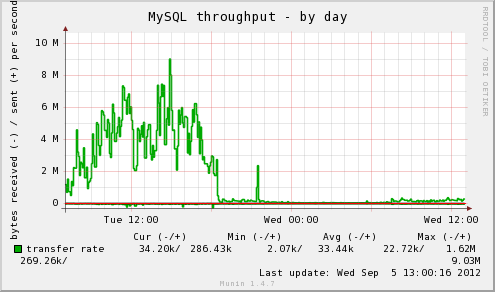
Knowing that these two tables, along with the system cache table, were queried on almost every page request, I decided I needed a way to cache the data so MySQL didn't have to spend so much time passing the cached data back to Drupal. Can you guess, in the following graph, when I started caching these things?
APC, Memcached, MySQL Query Cache?
If this site were running on multiple servers, or had a bit more infrastructure behind it, I would consider using memcached, which is a great caching system to run in front of MySQL, especially if you want to cache a ton of things and have a scalable caching solution (read this story for more). Running on one server, though, memcached doesn't offer a huge benefit compared to just using MySQL's query cache and tuning the innodb_buffer_pool_size so more queries come directly from memory. Memcached incurs a slight overhead due to the fact that data is transferred over a TCP socket (even if it's running on localhost).
MySQL's query cache is nice, but doesn't offer a huge speed benefit compared to how much more memory it needs to store a lot of queries.
I've often used APC (an opcode cache for PHP) to cache all a site's compiled PHP files in memory so they don't need to be re-read and compiled from disk on every page request (for most Drupal sites, if you're not already using APC for this purpose, you should be; unless you're using fast SSDs or a super-fast RAID array (and even in that case), APC will give probably a 20-50% gain in page load times).
However, I've never used APCs 'user cache' before, since I normally let APC run and don't want to worry about fragmentation or purging.
APC User Cache
There's a handy Drupal module, APC, which lets you configure Drupal to store certain caches in APC instead of in the database, meaning Drupal can read certain caches directly from RAM, in a highly-optimized key-value cache. APC caching is suited best for caches that don't change frequently (otherwise, you could slow things down due to frequent purging and fragmentation).
Some good candidates I've found include:
cache(includes entity_info, filter_formats, image_styles, and the theme_registry, many of which are queried every page load).cache_bootstrap(includes system_list and variables, queried every page load).cache_field(queried whenever field data is needed, grows proportionally to how many fields + instances you have).cache_views(queried whenever a view is loaded—even if your views are all stored in code).
You may find some other caches that are suitable for APC, but when you've decided which caches you'd like in APC, count up the data sizes of all the tables after the cache is warm, and then double that value. This is how many MB you should add to your existing apc.shm_size variable (usually in apc.ini somewhere on your server) to give a good overhead for user cache objects.
Monitor the APC cache size and usage (especially the free space and fragmentation amounts) using either the apc.php file included with APC (instructions), or using something like munin-php-apc along with munin monitoring. Make sure you have a good ratio of available vs. fragmented memory (more blue than orange, in the graph below):

When NOT to Use APC
APC is awesome for single-server setups. Especially if you have a site with relatively steady traffic, growing organically. APC is NOT helpful when you know you're going to need to scale quickly and will be adding servers (APC only benefits the server on which it's running). For a site that will exceed it's current capacity quickly, you'll probably want to consider first splitting your web server (Apache/PHP) from your MySQL server (but put them both in the same datacenter and connect via a private network), then consider adding a memcached server between the web and database server. From there, you can start adding more memcached servers and database slave servers as needed.
APC is also not very helpful if you don't have enough RAM on your server to store the cached objects (opcode + user cache objects) with at least 20-40% overhead (free space). In almost every situation, the default 32M apc.shm_size won't cut it, and in some cases, you'll need to push 128M or 256M before the server can run swiftly with a normal amount of fragmentation and purges.
Conclusion
It's always important to benchmark and profile everything. It's no use caching things in APC if you have a database query that takes 2 seconds to run, or an external web service call that takes 5! Once you've done things like tune database queries, check for obvious front-end performance flaws, and have your page load down to a couple seconds or less, start working on your caching strategy. APC isn't a good fit for everyone, but in this case, page generation times were cut at least 30% across the board and MySQL data throughput was cut by more than half!
A few important notes if you choose this route:
- Drush/CLI operations will effectively rebuild the APC cache for the command line every time they run, due to the way APC works (if
apc.enable_cliis turned on). However, it seems to have no effect on the separate APC cache for non-cli PHP. - Make SURE you monitor your APC memory usage, fragmentation, and purges. If you don't have about twice the required RAM allocated to APC, fragmentation and frequent purging might very well negate any significant performance benefit from using APC.
- Read through this Stack Overflow question for some more good notes on APC settings: Best APC settings to reduce page execution time.
Comments