WYSIWYG Editing (contentEditable support) in iOS 5
This post is more than 10 years old. I do not delete posts, because even old information is still useful, but please know that some material on this page may be outdated or incorrect. Thanks!
I haven't seen much about this feature yet, so I figured I'd put it through its paces and share what I found. WYSIWYG editing on iOS devices is finally here! For a long time, contentEditable support has been lacking on iPads, iPhones, and iPod Touches, and it's been slightly annoying, as the only way to add richly-formatted text on these devices was doing a two-step through finding the carat characters and writing the HTML yourself.
Plus, some WYSIWYG editors (like TinyMCE) simply disabled the WYSIWYG from attaching to a textarea if it detected an iOS device. No longer, however: I've tested CKEditor (latest nightly) and TinyMCE (latest nightly), and both work perfectly (surprisingly well, in fact!) on the iPad running iOS 5 beta 6:
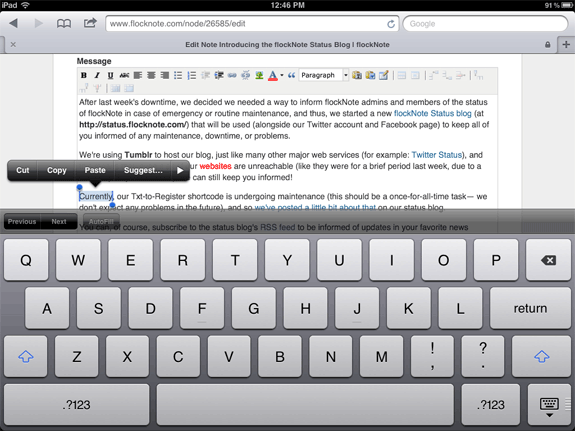
Demonstration:
Here's a video of me using TinyMCE on my iPad (it's fast, and works great!):
Some notes on WYSIWYG usage in iOS 5:
- To solve the problem of scrolling in WYSIWYG-enabled textareas, it looks like Apple decided to just expand the area to fit all the contents. So no scrolling whatsoever inside the body field.
- TinyMCE's resize widget doesn't work - it would be klunky if it did anyways, and the note above resolves any issues that would cause anyways.
- All the buttons I tested (image, link, bold/italic/underline, alignment, font color, style, table, etc.) worked perfectly, just as they would on a desktop computer.
- The only major annoyance is that the full onscreen keyboard pushes everything up, and a lot of scrolling up and down in the narrow viewport is required to format text. (However, if editing with an external keyboard, the onscreen keyboard doesn't hinder anything).
- The popover bubble that appears when you select text in the top couple of lines hides the WYSIWYG toolbar, so you might have to add a few carriage returns at the top of your post before making selections to the top few lines of text.
Other Wishes:
Now that iOS 5 seems to support rich text editing in the browser (a HUGE boon for online publishing in Drupal, Wordpress, Joomla, etc.), the only major flaw remaining is the inability to upload files (using the file select field). There's a workaround for this (at least, for Drupal: Post Photos/Images to Your Drupal Site from the iPad), but it's too cumbersome. I really want to just be able to select a photo from my camera roll and attach it to a post from time to time.
Comments