Review: GuitarJack Model 2 - Audio Interface for iPhone 4/4S, iPad
This post is more than 10 years old. I do not delete posts, because even old information is still useful, but please know that some material on this page may be outdated or incorrect. Thanks!
tl;dr: For stereo audio input, mic input, and guitar input, there's nothing better. Sound quality is excellent, and the unit is physically solid—almost too solid!
[Update on iPhone 5 compatibility: Sonoma says the GuitarJack works like a champ with the iPhone 5 if you use one of Apple's 30-pin to lightning connectors.]
In my quest to find the killer solution for audio recording/input on my iOS devices, I've tested a ton of different external microphones and audio interfaces for the iPhone 4/4S, iPad, and iPod Touch. One class of device—a multi-channel input through the iPhone 4's dock connector—has been elusive until just recently, when three different devices were introduced a year after the iPhone 4:
- Fostex released the AR-4i (see my review of the AR-4i here), a worthy but flawed stereo audio interface,
- Tascam released the iM2 (which I haven't been able to review), a stereo microphone, and
- Sonoma Wireworks introduced the GuitarJack Model 2, which I am reviewing here.
Video Review
If this review is tl;dr for you, here's a video review that says almost everything, and gives three example sound clips at the end for your listening enjoyment (that is... if you like listening to my voice):
If Looks Could Kill...
...then my iPhone would most certainly be dead right now. The GuitarJack hardware is beautiful, simple, and perfect for its function. The gunmetal finish is very elegant (but fingerprint-prone), the weight of the object makes it feel like it won't break the first time I drop it, and the plugs are all extremely solid. Everything's metal here.
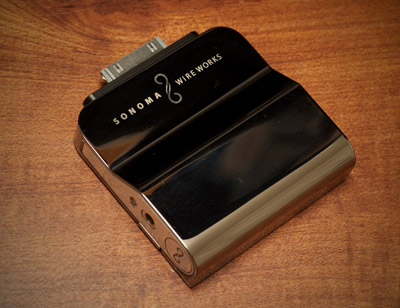
The only concern I have on the hardware side is the dock connection; It's the sole projection from the sturdy metal of the GuitarJack, and it's like a thin, delicate wafer of metal with "break me" written all over it. Since the GuitarJack is relatively heavy, I wouldn't imagine shaking the iPhone or using the iPhone in motion (side to side or up and down) while the GuitarJack is connected.
However, my simple solution to this problem is the ever-so-handy blue tape applied across the top and bottom sides of the GuitarJack-to-iPhone void.
Making Connections
The GuitarJack has a 1/8" mono/stereo audio input on the left, a 1/8" headphone jack on the right, and a 1/4" guitar jack on the right. All three plugs are solid, easy to plug things into but secure enough that plugs won't fall out.
My favorite feature of the GuitarJack is the flexibility of all these inputs; through FourTrack and other supported apps, you can set padding or boosting and gain control on all the inputs in almost any configuration.
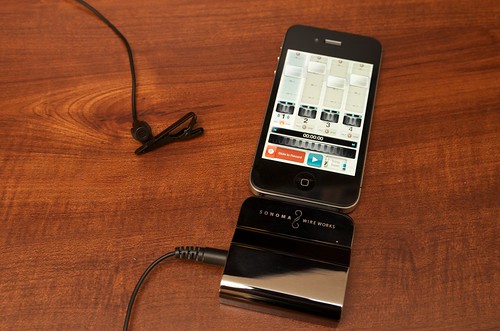
For example, I can plug in a Shure SM58 (one of my go-to vocal mics) to the left side mic input using a simple $5 XLR -> 1/8" adapter cable. Set the input to boost, and turn up the gain a little bit, and it's golden.
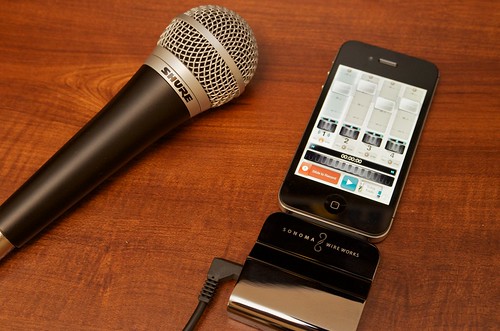
I can also plug a simple lavaliere microphone (like my favorite, the Audio-Technica ATR-3350 - $25 on Amazon) directly into the GuitarJack, set the input to boost, and adjust the gain appropriately, and it's golden.
I can plug a guitar with a pickup (or an amp) into the 1/4" jack on the right side of the GuitarJack, and the levels are perfect after a slight tweak to that input's gain in FourTrack's settings.
I can plug a stereo line output into the left mic jack on the GuitarJack, using a $2 stereo RCA -> 1/8" adapter. I set the input to pad, and adjusted the gain a little.
This audio interface is truly a swiss army knife for the iPhone 4, iPhone 4S, iPad and iPod Touch, when it comes to getting any kind of audio signal into the device!
It's All About the Sound – Quality
The sound quality of the GuitarJack Model 2 is excellent; much cleaner than the AR-4i, and definitely a lot cleaner than any mic connected through the iPhone's top headset jack (that input doesn't reproduce the full range of frequencies very well at all).
The analog-to-digital conversion in the GuitarJack is excellent, and allows for any level (mic or line, hi-z or lo-z, boosted or padded) to sound crisp and clean, with a very low noise floor.
Don't take my word for it, though! Here are a few sample recordings to show the sound quality (256 kbps MP3s):
- Shure PG48 XLR microphone into 1/8" mic input (00:41 - 1.3 MB)
- RadioShack 33-3013 Lavaliere microphone into 1/8" mic input (00:32 - 1 MB)
- Acoustic guitar into 1/4" line input (00:31 - .9 MB)
FourTrack - Professional Pocket Recording
FourTrack is a great companion app to FiRe 2 (my go-to app for standard audio recording), and luckily, both apps work great with the FourTrack, recording mono or stereo. FourTrack, though, was written by Sonoma Wireworks to take advantage of all the awesome features of the GuitarJack Model 2.
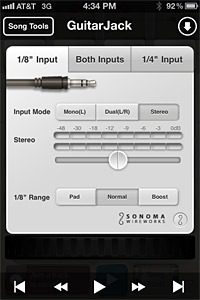
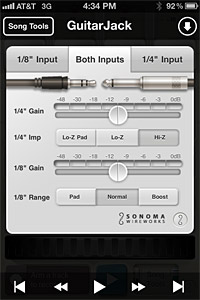
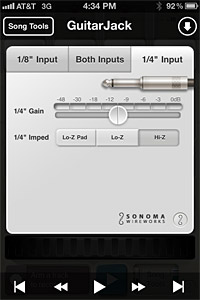
- Stereo mic/line input through 1/8" minijack (with gain or padding)
- Mono mic/line input through 1/8" minijack + Mono lo-z or hi-z input through 1/4" guitar jack (with gain or padding)
- Mono lo-z or hi-z input through 1/4" guitar jack (with gain or padding)
It would be super-amazing if the GuitarJack would allow recording three tracks—stereo line in + guitar—but this is a limitation of the iPhone's dock connector (it only allows stereo in and stereo out).
FourTrack allows for easy recording of up to two channels at a time, and lets you quickly loop through recording a song or other track by recording one track, then a second, then a third, etc. It's perfectly-suited towards those who record music... and well-suited towards those (like me) who do more FX or voice work.
Luckily, my (current) favorite recording app (FiRe) also works fine recording two tracks (or one) with the GuitarJack, and other apps also work okay (including the venerable Voice Memos app that comes with the iPhone).
Not All Roses - Video Recording
There are also, unfortunately, many apps that don't work, or work erratically, with the GuitarJack. The built-in Camera app and FilMic Pro being the two most glaring omissions.
For some reason, the GuitarJack doesn't work as handily as something like the AR-4i when used with standard video recording apps, so either the sound goes away completely, the internal mic is used, or the sound is garbled and 'digital-ish' sounding when recording with one of the camera apps.
Sadly, this means that I won't be using the GuitarJack Model 2 (at this time, at least) when doing any video recording. I know the device isn't advertised as a video recording helper... but being able to use a stereo VideoMic with this hardware would be incredible while recording video!
One other quirk I noticed in my use of the GuitarJack was its tendency to switch off the iPhone 4S's 3G connection after being unplugged, if only for a few seconds... there is a problem like this with the AR-4i as well, so I'm wondering if the iPhone 4S itself has some sort of bug with the detaching of audio interfaces. I'm not usually making phone calls with the GuitarJack attached, and unplugging it during the call, so this isn't an issue in real-world usage.
Summary
The GuitarJack Model 2 is simply the best audio interface for the iPhone 4, iPhone 4S, iPad, and iPod Touch. As long as you don't need to use the interface for video (which I do, quite often), this will be one of the best purchases you can make for mobile (or even studio) audio recording.
Buy the GuitarJack Model 2 on Amazon.com for $130.
Comments