Review: Fostex AR-4i iPhone 4/4S Stereo Audio Interface
This post is more than 10 years old. I do not delete posts, because even old information is still useful, but please know that some material on this page may be outdated or incorrect. Thanks!
tl;dr: Five stars for the capabilities, four for the fit and finish. It's a great tool, but not without a few rough edges. (See note about iPhone 4S compatibility).
[UPDATE on iPhone 4S compatibility: I've heard many reports of people having trouble with the AR-4i and the iPhone 4S; my own usage indicates that there is one quirk with this combo: the wireless signals on my phone go away while plugged into the AR-4i. Example recordings with various firmwares below:
- Sample 1 - Recorded on iPhone 4S with Firmware 1.0.0 (MP3)
- Sample 2 - Recorded on iPhone 4S with Firmware 1.1.1 (MP3)
- Sample 3 - Recorded on iPhone 4S with Firmware 1.1.2 (MP3)
Fostex has fixed a few issues (like a strange clicking noise) with firmware updates, but I don't know when they'll get the WiFi/3G connectivity issue fixed—hopefully soon.]
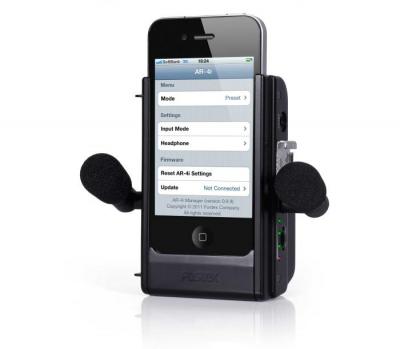
I received a demo Fostex AR-4i unit for review, and was excited to finally record two channels at once (stereo) on the iPhone 4/4S. If you've read my guide to external microphones on iPad, iPhone, and iPod touch, you'll note that (until the AR-4i) there was no way to record stereo inputs on the iPhone 4/4S. This is no longer the case.
Video Review (and test)
I've recorded a few clips with the unit and Apple's built-in Camera app, and I've also included some footage of the device itself, where I show some of the relevant details of the hardware itself:
Audio Quality
No external audio interface would be worth anything if it didn't do a good job getting a good, clean audio signal from a microphone. The AR-4i comes with two little cardioid mics that will definitely work in a pinch, but won't give a clean signal like a handheld mic or a lavaliere.
You can plug in any mic that gives a normal mic level signal, as long as you adapt the cable into a 1/8" mono plug. I highly recommend the $20 Audio Technica ATR-3350 Lavaliere mic for interview situations (get two of them - they're cheap and they work great in a mobile situation!), but most mics will do just fine.
Since you only have level control for both inputs together (there's only one input level adjustment knob), you have to make sure your two mics have similar levels coming into the unit, otherwise one channel will be louder/softer than the other.
You can hear a couple different recording scenarios in my video embedded above, and I'll try to add a few more audio-only sound samples to this post as I get time. Suffice it to say, though, this device has a low noise floor, and could definitely be used for broadcast recording. It's definitely not studio-quality, but will work for live gigs, podcasting recordings, radio and TV, etc.
Apps Supporting Stereo Sound
I've only used the device with a few apps so far, and I'll continue to update this section as I get time:
- FiRe 2 (Field Audio Recorder 2) - works beautifully and allows for recording two-channel, uncompressed audio, then exporting via multiple methods as AIFF, WAV, AAC, Ogg, Lossless, etc. (FiRe is also tested and working).
- Camera (built-in) - works fine for stereo recording.
- FiLMiC Pro - Untested.
- Voice Memos (built-in) - Untested.
Build Quality
For a prosumer product, the build quality is pretty good; the plastic case feels pretty solid and could withstand some knocking around inside a hard case. All the mic jacks and knobs feel sturdy and solid, and I don't feel like I need to be gentle with any of the controls on the device.
As a strictly professional unit, I would say the product is good, but with its flaws; the battery holding area is a little cavernous, and hard to use for people with anything but the smallest of hands, and the fabric strip that is meant to help pull out the batteries wasn't long enough to actually fit behind both batteries, so I have to use a long flat tool to pop the batteries out.
The battery door doesn't feel like it will pop off too easily, but with an all plastic, non-hinged design, I do think it will reach the point after a few openings and closings where it will pop off after a slight knock. However, considering the fact that I'll be buying an iPhone 5 in less than a year, and it won't work with this device, is that really a bad thing?
I only have three complaints about the overall hardware design:
- The metal (but mounted-in-plastic) tripod mounts - the two tripod sockets fit any standard size tripod or tripod mount, but one on my unit was slightly out of alignment, so I have to be careful when tightening a tripod screw to not snug it up too tight. I like tight tripod connections, so that's a point against this case; I feel that if I keep tightening, it might break the mount free of the casing.
- The device is slightly awkward to hold—even with the included metal grip. It doesn't conform to a handheld situation in either orientation, and seems built only to be optimal for tripod-mounted or grip-mounted situations. In the interests of keeping my on-the-go bag light, I don't like having to bring the heavy metal grip with the AR-4i.
- It's hard to pull out the iPhone (but it's easy to get it in). The dock connector is a bit tight, and it requires two hands and a little more pressure than I'd like to pop the iPhone free of the dock connector. Care needs to be taken in this process.
Even with these gripes, though, I think it's not a bad deal; the case can stand upright in the vertial orientation pretty well, and lets me view the iPhone screen easily while I'm doing an audio recording. And it doesn't feel like it's going to fall apart. All the internal connections seem to be solid.
Features
Some of the neat little things I've found about the AR-4i:
- Built-in preamp for cheaper mics means I don't need to post-process the audio as much (for amplification).
- Built-in LED level is actually a very good measure for when clipping will occur (though I wish it had one or two more LEDs for better granularity).
- The design allows for easy use in either vertical or horizontal orientations, and video shooting seems to be optimal in the horizontal axis (as it should be), with a hotshoe mount included on the top.
- The AR-4i App (more below) is a great help towards tailoring the device's capabilities toward any situation. Being able to set, in hardware, limiting and channel panning, or stereo/mono capabilities, is extremely helpful. This allows any app to work with most of the AR-4i's features, since they don't have to specifically support the unit's capabilities.
iPhone App
Fostex announced the availability of the free AR-4i App on the iOS App Store in September 2011. The App (in its initial configuration) is a little rough around the edges: you can tell the user interface text was originally written in another language and translated into English:
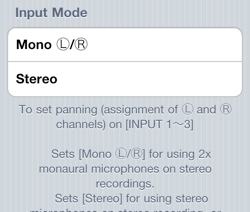
- Independent control of Inputs 1, 2 and 3 (a little confusing, though).
- Low cut filter (off, 200Hz, 500Hz, 1kHz)
- Limiter (off, fast, slow)
- Headphone jack control
- Firmware update and hardware settings reset
There is currently no other device on the market which offers all the features of the AR-4i, and coupled with some of the awesome tweakability of this App, the device really makes the iPhone 4 a professional audio recording platform.
Notes and More Info
Notes will go here.
Read more about the AR-4i on Fostex's website »
Buy the AR-4i
The Fostex AR-4i retails for $149, and can be purchased on Amazon.com with free shipping.
Comments