Adding Images to Search Results (Drupal Search)
This post is more than 10 years old. I do not delete posts, because even old information is still useful, but please know that some material on this page may be outdated or incorrect. Thanks!
For a while (earlier in my Drupal career), I was avoiding adding imagefield-attached images to nodes that appeared in my search results, because I remember the first time I tried doing so, I was still quite confused by the way drupal handled search results theming.
Well, after another crack at it, I finally have a nice, performant way of displaying images from nodes added via imagefields (or in drupal 7, image fields) inline with search results, and it didn't require much work at all!
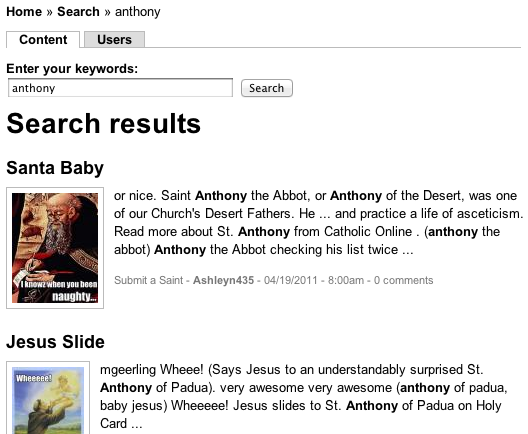
The image above shows inline images for LOLSaints.com, a site which uses Midwestern Mac's Hosted Apache Solr search service to return results quickly and allows faceting, etc. using the excellent Apache Solr Search Integration module. But the technique I'm using works equally well with built-in (but slower) Drupal core search module's results.
Step 1 - Preprocess the search result to get the image data
The first thing you'll need to do is add something along the lines of the following into your theme's template.php file (if there's no template.php file in your current theme, add your own, and just paste in what's below). Change the 'THEMENAME' text to your theme's name:
<?php
/**
 * Process variables for search-result.tpl.php.
 *
 * @see search-result.tpl.php
 */
function THEMENAME_preprocess_search_result(&$variables) {
  // Add node object to result, so we can display imagefield images in results.
  $n = node_load($variables['result']['node']->nid);
  $n && ($variables['node'] = $n);
}
?>
This code basically grabs the node id (nid) of the node being displayed, loads the full node object, and sends the node object over to your search result template, which we'll modify next... (note: if you're displaying tons of nodes per page in your search results, this can be a little taxing. I usually limit it to 10-15 results per page).
Step 2 - Modify search-result.tpl.php to display the image
Next, find the 'search-result.tpl.php' file in drupal core (located in core's modules/search folder), make a copy named exactly the same inside your theme's folder (or inside a 'templates' folder in your theme's folder), and add something like the following wherever you'd like the picture to show up (for my example, I was using an imagefield named 'field_article_image').
<code>
<?php if (isset($node->field_article_image[0]['filepath'])): ?>
<?php endif; ?>
For Drupal 6, you can print the image using imagecache at whatever size you want using something like the theme() function I used above. I'll leave it up to the reader to implement the proper theme function for image styles in Drupal 7 :-)
Comments