Tabbing Between Fields in Google Chrome (vs. Tabbing through everything)
⚠️ Warning
This post is more than 10 years old. I do not delete posts, because even old information is still useful, but please know that some material on this page may be outdated or incorrect. Thanks!
This post is more than 10 years old. I do not delete posts, because even old information is still useful, but please know that some material on this page may be outdated or incorrect. Thanks!
For some users, being able to tab through all clickable elements on a page is a blessing. For most, though, it's a curse (at least, in my experience). The default behavior of a browser should be to allow users to tab through form elements only (textfields, textareas, search forms, submit buttons, etc.).
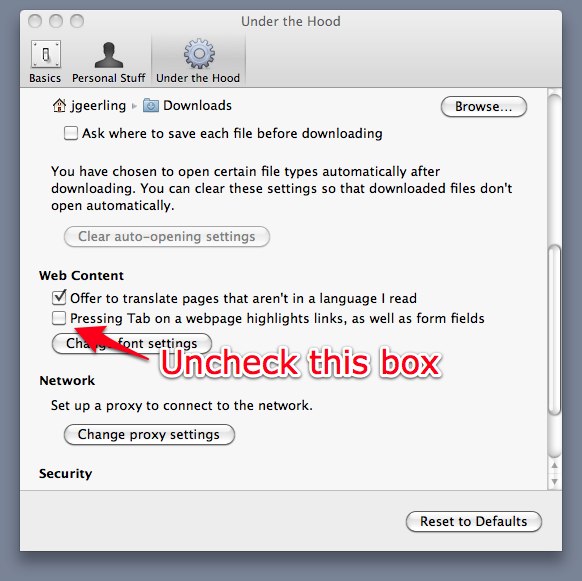
For some time now, Google Chrome has only allowed users to tab through every. Single. Element. on the entire page. Luckily, there's a new setting that popped up in the 'Under the Hood' settings recently that allows a user to turn off this insane behavior.
In Chrome, select Preferences, then click on 'Under the Hood.' Go down to 'Web Content' and uncheck the checkbox next to "Pressing Tab on a webpage highlights links, as well as form fields."
Comments