iPhone and iPod Touch - Professional Digital Audio Recorders
This post is more than 10 years old. I do not delete posts, because even old information is still useful, but please know that some material on this page may be outdated or incorrect. Thanks!
More info and recommendations: iPhone/iPad external microphones
Though my years as an audio recording engineer (I've worked with CBS and some local audio production groups—I even helped record an amateur rock album), I have used a wide variety of audio recording devices—8-tracks, professional reel-to-reel machines, cassette recorders, miniDisc recorders, even many current cream-of-the-crop digital audio recorders (like the Zoom H2, Zoom H4, and Marantz PMD-660 etc.).
Almost all of these recorders have one thing in common: they are inconvenient to have to lug around.
I have been experimenting with my iPhones (3G, 3Gs, and now the iPhone 4) over the years to see if I can finally find a great recording solution that will allow me to replace any need for a dedicated digital audio recorder. I think the time has finally come.
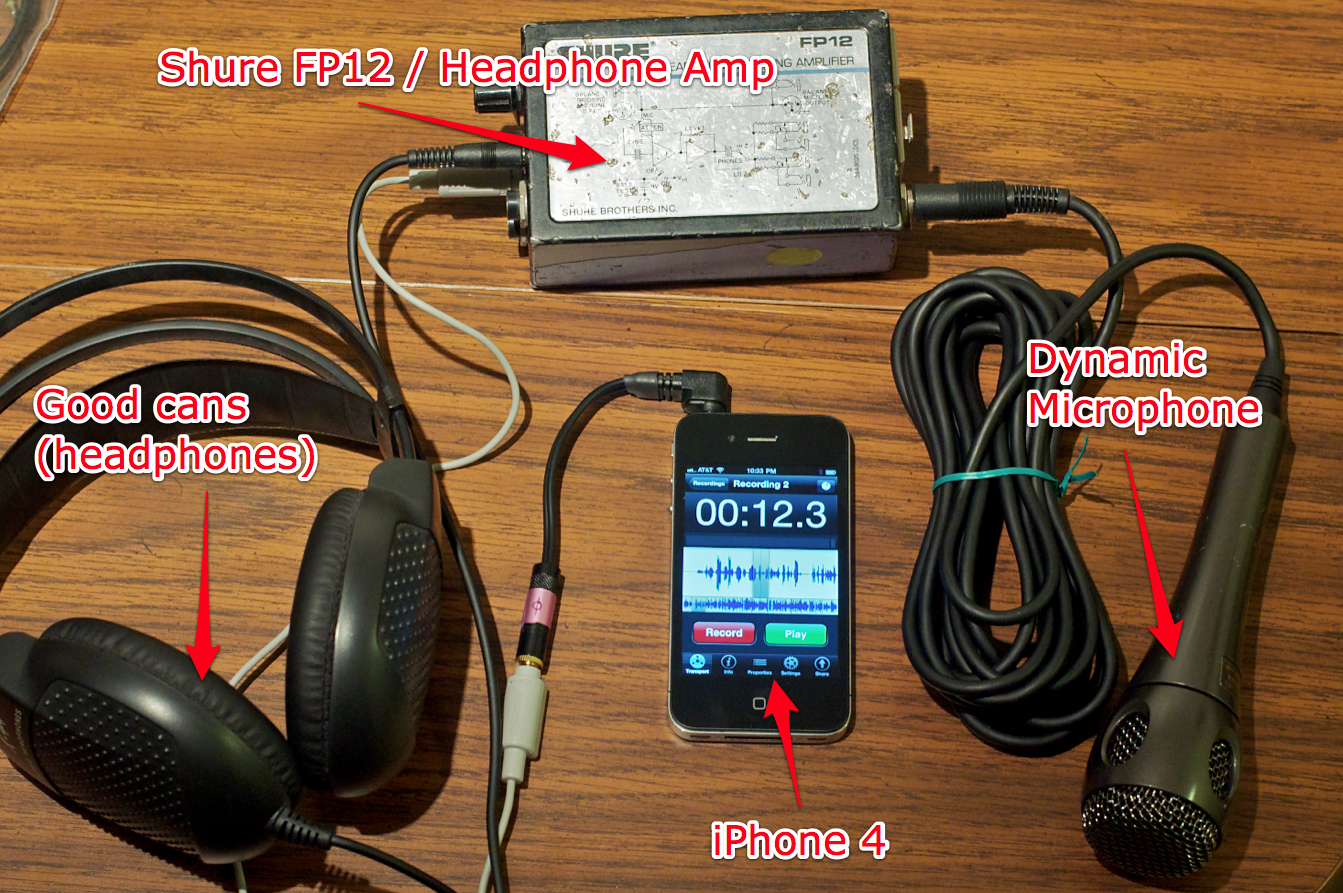
A few configurations I have used include:
- Recording with the iPhone's built-in microphone
Example: Here's a podcast episode for LOLSaints.com that I recorded this way. It sounds good enough for many situations, especially in quieter environments. - Recording with a lavaliere microphone adapted through a KVConnection cable
Example: Here's a 180 KB MP4 audio file recorded in Voice Memos. Works great for on-the-go interviews, but there's no analog level control pre-iPhone. - Recording with a Shure FP12 headphone amplifier + dynamic mic (see picture above)
Example: Download a 10 MB 44.1 kHz AIF file recorded in FiRe. Using the FP12 allows me to not only monitor the mic signal in real time (the iPhone's circuitry introduces about a 1/10 second delay), but also allows me to control mic levels with analog precision.
With apps like FiRe and iProRecorder in the App Store (I have and use both), there is no longer any reason to avoid moving my entire audio recording workflow over to my iPhone—it's always on my person, and instead of lugging around another device, I can simply carry a mic and adapter... or use the FP12 for more professional/bold sound.
FiRe allows for input passthrough (so you can monitor what you're recording if you have a cable that splits out the mic and headphone jack, like this one from KVConnection.com). It also allows for input gain adjustment—although it's better to control the gain before it gets into the iPhone/iPod, as the hardware on the device seems to have some sort of automatic limiting based on the level coming into the iPhone/iPod.
With most audio recording apps on the iPhone, getting the recorded files off the iPhone/iPod and into other software is easy—you can upload via FTP, email files, or browse the iPhone/iPod via your WiFi network.
Level Control and Monitoring with Shure FP12
Thanks to @radijoe, I found a great portable headphone amp which plays double-duty as a mic preamp and inline analog level control in the Shure FP12. It is powered by a single 9V battery, and includes a belt clip for easy portability.
Here are pictures of the front/top and back/bottom of the FP12:
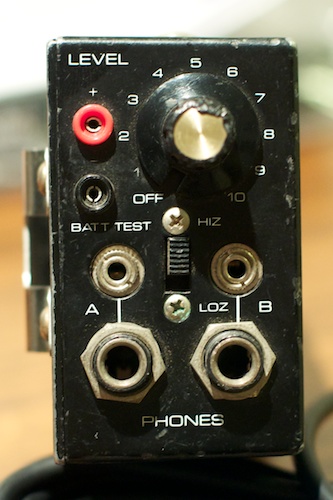
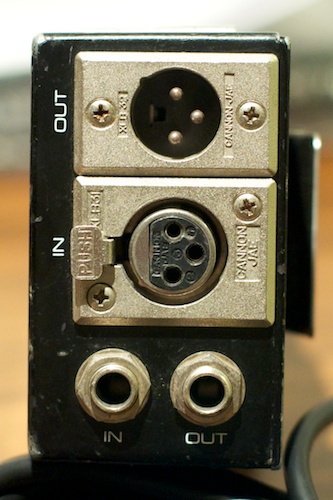
As you can see, you can plug in either an XLR or TRS microphone or line-level input (there's a little mic/line input selector switch on the side of the FP12). The, on the other side, there are both 1/8" and 1/4" TRS connections for headphones or line-level outputs, along with a Hi-Z/Lo-Z (impedance selector) switch and an analog level control.
I can plug a dynamic XLR mic like the SM58 straight into the iPhone using this KVConnection.com cable (or this one, with headphone jack, or an attenuated XLR adapter from VeriCorder), but using the headphone amp allows me to do so much more.
This little box, either standalone, or clipped on a belt, gives me the ability to take almost any sound input and convert it into a very usable signal level for the iPhone, using a KVconnection TRRS adapter with built-in line-level attenuation. Plus, I can use the other headphone jack to plug in monitoring headphones with no delay, so I can hear exactly what's going into the iPhone.
Alternatives to the Shure FP12
Since the FP12 is (a) no longer being manufactured, and (b) relatively difficult to find (I got mine for a lucky $40 grab on eBay), you might look into finding a different headphone amp or powered input level adjustment device. Here are a few I can recommend (although without any guarantees as to quality):


Stereo Recording
One limitation with using the iPhone's headset jack is that you can only use one channel for recording—for most of my purposes, this is fine. However, many times I would like to have a stereo recorder; either to grab a stereo sound image of a choir singing, or to record the stereo output from the radio, my computer, etc.
This limitation should be able to be overcome by using the iPhone/iPod Touch's Dock connector, which has pins for stereo line-level input. I'm going to be experimenting with a couple solutions to see if I can get a relatively inexpensive connection wired up through the dock connector. (And I'll update this page with more info as I test different solutions).
Solutions I might try over the next few weeks:
- Using a custom-made dock connector with a line input
- Using a Blue mikey for stereo environmental recording
- Using an Alesis ProTrack for recording with an iPod Touch (might not work with iPhone :()
Do you have any other ideas or tests I should perform? Leave a comment!
Comments