How to: Batch Delete Photos on the iPad
This post is more than 10 years old. I do not delete posts, because even old information is still useful, but please know that some material on this page may be outdated or incorrect. Thanks!
Today my iPad told me it was out of space. Not believing that for a second, I remembered that I had taken about 9 GB worth of RAW photos last weekend, and dumped them all on the iPad. I thought they were deleted by Aperture after I imported them, but I guess they weren't.
Lacking any easy way of deleting photos through Aperture's Import interface, or through Image Capture [Edit: Image Capture does allow 'select all' or 'batch selection' of photos to delete] (without having to reimport all the photos again), I found a useful shortcut to selecting tons of photos at once on the iPad for deletion.
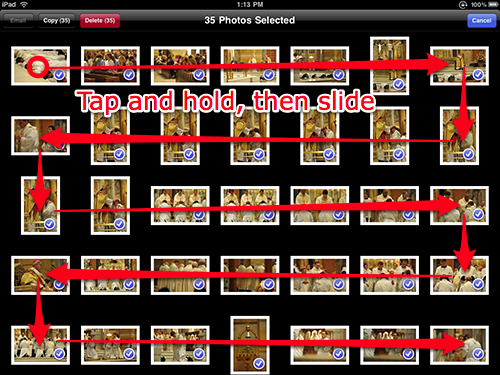
Simply tap the share button to start selecting photos, then hold your finger down on a photo until it is selected (the little blue arrow shows up on the bottom right), and swipe your finger across multiple photos.
Nice!
Comments